


Step-by-step guide
 Step-by-step guide
How to Start Latency Arbitrage Trading: Step-by-Step Guide for Beginners
To start latency arbitrage, you need four things: Westernpips Private 7, a VPS next to your broker, a fast quote source and a broker account you have tested with the minimum lot. This guide walks you through nine practical steps, from learning the basics to trading within your broker’s rules.

By Alexander Vinsky, Lead Developer and Chief Technical Specialist at Westernpips · Published · Updated · About the author
- 9 steps
- Broker deposit from $100
- Support 24/7
Before you start
A professional tool for speed and precision
HFT arbitrage with Westernpips Private 7 is an automated trading system for traders who value speed, precision and efficiency. It lets you trade faster than most market participants and use even the smallest market inefficiencies. The technology gives you the foundation; your knowledge, discipline and practice turn it into results.
What you need to start
| Item | What it is | Cost |
|---|---|---|
| Software | Westernpips Private 7 lifetime licence: WP Silver, Gold or Platinum | from $777 once |
| Fast quotes | WP Fast Sources and subscription algorithms | free 90 days, then $150/month |
| VPS | Windows server next to your broker (LD4 or NY4) | from about $40/month |
| Broker account | ECN/STP account; test first with the minimum lot | from about $100 (about $2,000 for a comfortable start) |
| Time | Install and first Back Tester tests | a few days |
| Experience | Trading experience before live latency arbitrage | at least 3 months, better 1 year+ |
| Your presence | Control of trading at the computer | European and American sessions |
Approach it as a professional instrument, the way you would run a business: learn how markets and liquidity providers work, follow the instructions and methods developed by our team, test before you scale and build a stable strategy step by step. In arbitrage the saying “money loves silence” fits perfectly: quiet work, precise execution and disciplined risk management always outweigh noise and emotions.
Myths and facts
What traders ask on forums, answered honestly
- “It is easy money.”
- It is a professional technique. Results come from a good broker, fast infrastructure, tested settings and discipline, and losses are possible.
- “The robot trades by itself, I can switch it on and leave.”
- No. The trader controls the process at the computer during the European and American sessions and reacts to news and changes in execution.
- “Any broker will do.”
- No. The broker is the most important choice: test execution, slippage and withdrawals with a small deposit before scaling up.
- “The broker will just cancel my profits.”
- That risk comes from trading against the broker’s terms. Read the terms, confirm your strategy in writing and use algorithms that fit the rules, such as TwoLegLock and OneLegHidden.
- “Latency arbitrage stopped working.”
- The naive version against any slow broker did. With fast data, a suitable broker and realistic testing it still works; see the 2026 Myfxbook monitorings.
- “I can buy a cracked copy cheaper.”
- Cracked copies get no fast feeds, updates or support and are a common way to steal broker passwords. Buy only from Westernpips.
- “I need a programmer.”
- No. Westernpips Private 7 is ready-made software with documentation and 24/7 support.
Step 1 of 9
Understand the strategy before setting up your system
Latency arbitrage compares a faster reference price with quotes from a connected broker. When the broker's quote has not yet reflected a market move, the software may detect a temporary difference. Whether an order can be filled at a useful price depends on execution time, spreads, commission, slippage and the broker's rules. For a detailed explanation of the mechanism, strategy types and research, read our latency arbitrage guide. This page focuses on the practical steps needed to prepare and test a Westernpips Private 7 setup.
Who it is for. This is not a set-and-forget strategy. Traders need to monitor connections, price feeds, execution reports and changing market conditions. Start by learning the software and testing your setup before considering live trading. Use only capital you can afford to risk; results from historical or demo tests do not guarantee future performance.
Before you move to the next step
- Decide which broker account and instrument you want to evaluate.
- Confirm that the broker permits your intended automated strategy.
- Plan to record actual execution time, spreads, slippage and rejected orders.
- Use the Westernpips Private 7 product overview for software features, and continue below for setup and testing.
Step 2 of 9
Choose your Westernpips Private 7 plan
Westernpips offers a full range of arbitrage tools for different markets and brokers. Choose the plan that fits your goals and experience: WP Silver ($777) for classic latency arbitrage with M4 Platform Brokers, WP Gold ($1,777) with M5 Platform Brokers, cTrader FIX and the two-leg algorithms, or WP Platinum ($2,777) with every FIX, API and ITCH connector, the Remote and Copier algorithms and two licences. Each is a lifetime licence with free updates.
Sign the documents and pay in your account at my.westernpips.com, then download the software there. The licence is activated within 1–3 days, and our team helps you install it.
How to pick the right plan
- WP Silver suits you if your brokers use the M4 platform and you start with one VPS and classic one-leg arbitrage.
- WP Gold suits you if you trade M5 platform or cTrader brokers, or plan to work with brokers that prefer hedged trading through TwoLegLock and MultiLegSpread.
- WP Platinum suits professionals and teams: FIX, API and ITCH connections to liquidity providers and exchanges, the Remote and Copier algorithms for several servers, and two separate licences.
You can start with a smaller plan and upgrade later. Every plan includes the full subscription free for 90 days: WP Fast Sources, OneLegMulti, OneLegHidden, TwoLegStandard, the Strategy Back Tester and the Analyzer, which is enough time to test several brokers.
What happens after purchase
- You sign the Client Agreement, License Agreement and Risk Warning online in your account and pay in USDT, Bitcoin or through Wise.
- The licence is activated within 1–3 days, or from 1 hour on request.
- You download the software in your account, and our team helps you install it on your VPS.
Buy only from Westernpips. “Cracked” or cheap copies of Westernpips software are sold on third-party sites and in chats; buyers lose their money, and modified builds can steal broker logins and passwords. Download the software only in your account at my.westernpips.com and check sellers against our official contacts. More in Westernpips crack and fake sellers.
Do: compare the plans on Plans and Prices.
Step 3 of 9
Rent a VPS next to your broker
Westernpips Private 7 runs on a Windows VPS, not on a home computer: the server must sit close to both ends of the trade: your broker’s trading server, where the orders go, and the fast quote server, where the prices come from. Most Forex brokers and quote sources are in London (LD4) or New York (NY4), so orders and quotes travel in milliseconds. A VPS with Windows Server 2022 or later, 2–4 CPU cores, 4 GB RAM and an 80 GB disk is enough.
How to find where your broker’s server is
Brokers rarely publish the location of their trading servers, but you can find it. Server names often contain the city, for example “London” or “NY”. Measure the ping from VPS in different data centres to the broker’s server address: the location with a ping of about 0–2 ms is where the server stands. Our support team knows the locations of many popular brokers.
Close to the broker and to the fast quotes
Two delays add up in every trade: the time the fast quote needs to reach your VPS and the time your order needs to reach the broker. The best case is a VPS in the data centre where both the broker’s server and the quote server are. If they are in different places, measure the ping from candidate VPS locations to both and choose the location with the lowest total, often the broker’s data centre or a point in the middle of the route between them. Westernpips Private 7 shows the ping to the WP Fast Sources servers, and the trading terminal shows the ping to the broker, so you can compare locations in minutes.
VPS checklist
- Windows Server 2022 or later, 2–4 dedicated CPU cores, 4 GB RAM, 80 GB SSD.
- The same data centre as the broker and, ideally, the quote source: LD4 (London), NY4 (New York) or TY3 (Tokyo) for many Forex brokers; otherwise the location with the lowest total ping.
- A stable network with low and steady ping, checked at different times of day.
- Automatic Windows updates and restarts moved outside trading hours, and the system clock synchronised.
Several brokers in different data centres
If your brokers are in different cities, use one VPS per location. The Remote algorithm of Westernpips Private 7 on WP Platinum trades two accounts as one strategy while each account runs on its own VPS next to its broker.
How fast is each type of connection?
Approximate round-trip times show why location and connection type matter:
| Setup | Typical delay | Suits arbitrage? |
|---|---|---|
| Home computer and internet | about 50–150 ms, unstable | no |
| VPS in another city or region | tens of ms | rarely |
| VPS in the broker’s data centre, M4/M5 or cTrader | about 0–10 ms ping | yes, the standard setup |
| Server in the data centre with a FIX connection (WP Platinum) | a few ms or less | yes, the professional setup |
The values are a guide: measure your own ping and execution time, because they differ by broker and provider.
Do: pick a provider from our list on VPS for arbitrage, compare budgets in HFT infrastructure cost, or ask support for a recommendation for your broker.
Step 4 of 9
Install the software and learn its settings
After installation, take time to understand the settings and capabilities of Westernpips Private 7: the better you know how the algorithms and connectors work, the better your results. The documentation explains installation, settings and every algorithm, the support forum answers technical questions, and our team helps 24/7 when something does not work.

Set-up in the right order
- Install and activate. Enter the e-mail from your Client Agreement in the Login section and click “Request Activation”.
- Connect the fast source. Turn on WP Fast Sources or connect your own feed.
- Add broker accounts. In the Connections section add your M4/M5, cTrader or FIX accounts and choose the server with the lowest ping.
- Map the symbols. Brokers name symbols differently, for example EURUSD, EURUSD.cl or EURUSDm; link each broker symbol to the fast feed symbol.
- Choose the algorithm and set its key parameters.
- Test first on recorded ticks in the Back Tester or on a demo account.
The key settings to understand
- Minimum gap: how far the broker must lag before a trade opens; it must cover spread and commission.
- Lot: the trade size for each account.
- Maximum slippage: the largest price difference you accept on a fill.
- Holding time and closing rules: when the algorithm closes a position.
- Execution Control: the limit on order execution time that pauses trading when execution slows down.
Do: read the algorithm guide and the FAQ before your first live trade.
Step 5 of 9
Connect a fast quote source
The fast quote source is the reference price that shows where the market is moving before your broker. You have three options:
- WP Fast Sources: ten ready low-latency feeds included with every plan, free for the first 90 days.
- Your own liquidity provider account: receive quotes over API, FIX or ITCH from large providers such as PrimeXM, oneZero and others (WP Platinum). Choose by your country of residence and the minimum deposit.
- EA connectors: take quotes from a fast terminal, for example the AMP terminal, whose quotes are also very fast.
How to choose a quote source
The best source for you is the one that leads your broker on the symbols you trade. A source is good when it updates before your broker, stays stable during news, covers your symbols and is close to your VPS. A very fast source is wasted if the rest of your chain is slow, so match the source to your broker and setup.
Test the source against your broker
Record the ticks of the fast source and of your broker in Westernpips Private 7 and review them in the Back Tester and Analyzer: how large the gaps are, how long they last and at what times of day they appear. If the gaps are rare or smaller than your costs, try another source, another symbol or another broker.
Step 6 of 9
Choose and test a broker
Choosing the right broker is the most important step. Many brokers show the same quotes on demo and live accounts, so a demo account gives a quick first check. For a deeper look use the Westernpips Private 7 Back Tester & Analyzer: it shows quotes on a chart, finds gaps and delays, replays recorded tick traces and helps optimise settings for your strategy. If the broker shows steady delays and signals, open a live account with a small deposit and confirm the signals with the minimum lot before scaling up.
Which account type to open
Choose ECN, STP or raw-spread accounts with commission and direct liquidity access; they usually execute faster and suit arbitrage better than standard accounts with wide spreads. Read the client agreement before you open the account: look for clauses about prohibited strategies, latency arbitrage, minimum trade duration, hedging and “abusive trading”.
A two-week broker test
- Record quotes on the demo account and check the gaps in the Back Tester.
- Open a live account with a small deposit and trade the minimum lot for about two weeks, including at least one major news release.
- Keep the logs: execution time, slippage on each order, rejections and requotes.
- Make a small test withdrawal early to check how the broker processes payments.
- Increase the volume only when execution stays stable and the results match your tests.
Broker scorecard
| Metric | Good sign | Warning sign |
|---|---|---|
| Ping from VPS | 0–10 ms, stable | high or jumping values |
| Execution time | a few to tens of ms, stable | above 1,000 ms or rising over time |
| Slippage | near zero, positive and negative balanced | almost always against you |
| Rejections and requotes | rare | frequent, mostly on winning trades |
| Spread you pay | as quoted | wider than on the chart |
| Withdrawals | processed on time | long delays and extra checks |
Full guide: execution models, platforms, regulation, questions to ask and red flags are covered in How to find the best Forex broker for latency arbitrage.
Check 1. Order execution time
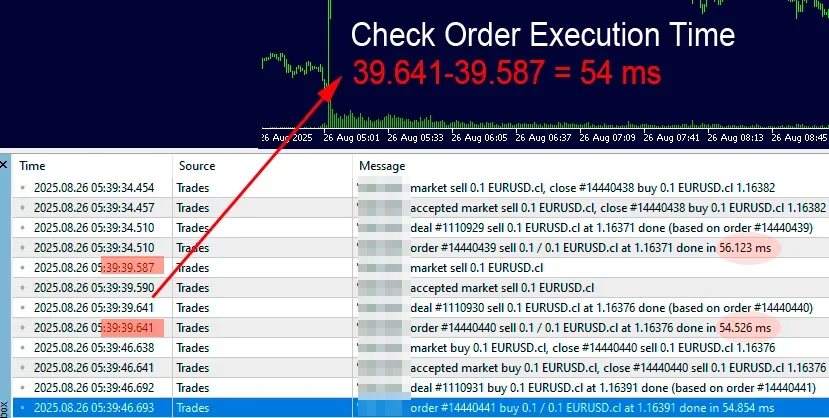
Open a test order by hand or wait for the first trade in Westernpips Private 7 and look at the time in the log. If the execution time is more than 1,000 ms, the broker is not suitable for arbitrage, or the account already has slower execution. The Execution Control settings in Westernpips Private 7 monitor the open and close time and stop trading automatically when it exceeds your limit.
Check 2. Execution price and slippage
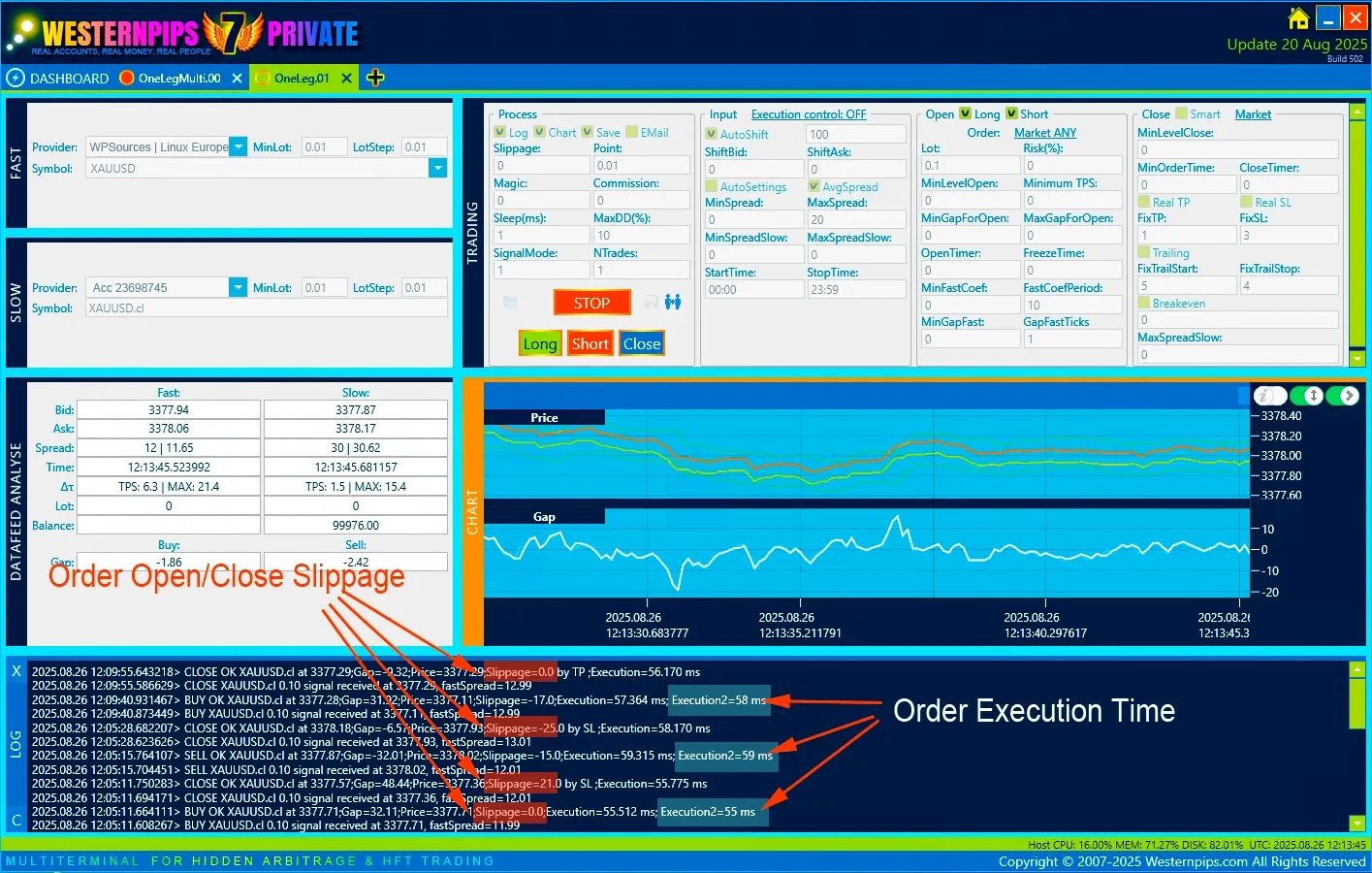
Many brokers aggregate prices from several providers, so an order may be filled at a new market price instead of the price your algorithm requested. The difference is slippage: slippage = request price − order open price. For arbitrage, slippage must never be larger than the gap that triggered the trade; the ideal is zero, when you keep the full gap as profit. Some brokers use slippage as an extra source of income, so measure it on every account: Westernpips Private 7 logs it for each order.
Check 3. Ping to the broker and to the quote source
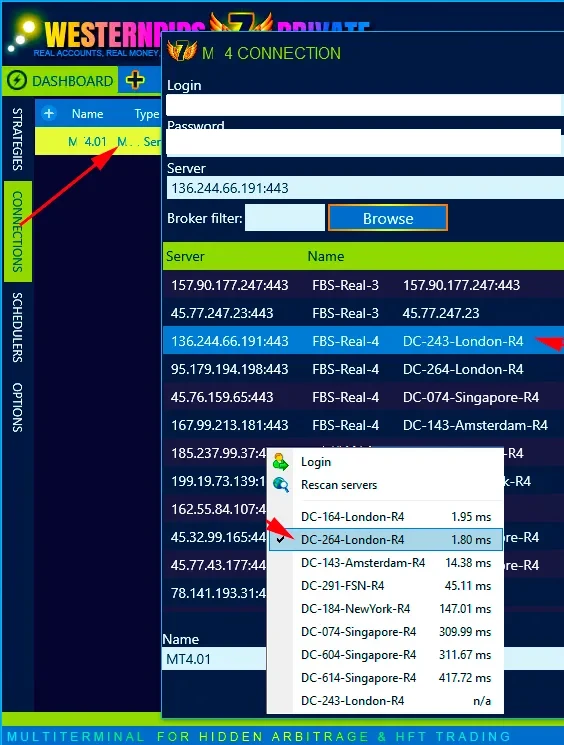
Execution speed and slippage depend on the ping to the broker’s server. Check it in the corner of the trading terminal and connect to the server with the lowest ping: 0–10 ms is ideal. A higher ping usually means the broker’s server is in another data centre, so rent a VPS closer to it. Test several VPS locations and keep the one with the lowest and most stable ping: you get faster execution, lower slippage and more consistent results. See the ping guide on our forum; Westernpips Private 7 also shows the ping to the WP Fast Sources servers.
When is a broker suitable?
Low ping, fast execution and zero or minimal slippage: such a broker suits arbitrage. Choose the optimal settings for your instrument with the user guides, and you are ready to trade.
Step 7 of 9
Trade at the best times
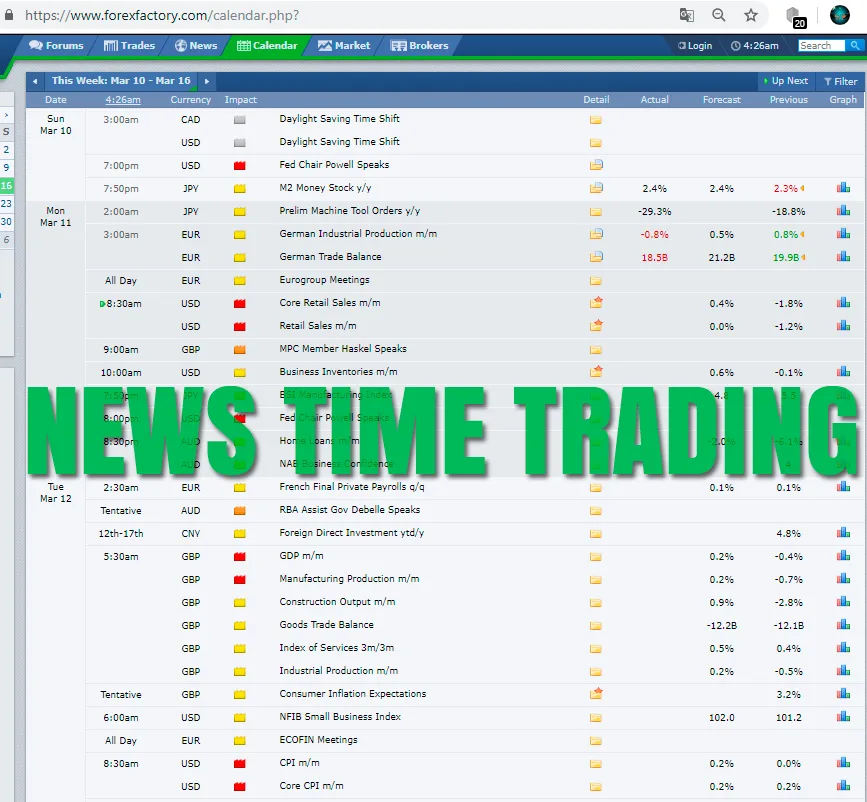
Arbitrage finds the most opportunities when the market is volatile, above all at the release of major economic news: broker servers are loaded with client orders, and their quotes lag behind the fast sources. The opening of the European and American sessions is another good time, as activity rises sharply. Some traders focus only on news arbitrage, using sharp moves and short-lived price differences. If your broker trades through a web terminal, Westernpips WebClick applies the same idea there.
The same moments bring wider spreads and more slippage, so keep the slippage limits and Execution Control of Westernpips Private 7 switched on.
Use the economic calendar
Plan trading around high-impact releases: US employment data (Non-Farm Payrolls), inflation (CPI), central bank rate decisions and speeches. The most active periods are usually the first minutes after the release. Check the calendar every week and know which events move the symbols you trade.
Session openings and quiet hours
Activity rises at the opening of the European session in the morning in London and again when the US session opens. The quietest period is around the daily rollover late in the evening in New York, when spreads often widen and liquidity is thin; many traders avoid it. The Schedulers section in Westernpips Private 7 helps you plan when algorithms run; see the documentation.
Step 8 of 9
Grow carefully and withdraw regularly
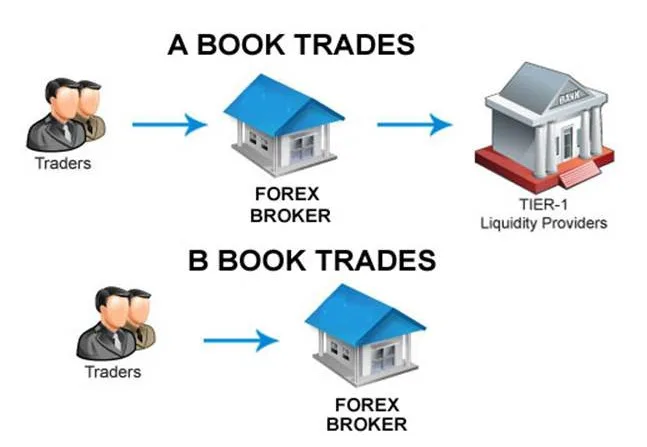
When you find a reliable broker and start earning, keep watching your algorithm’s performance. Many brokers do not pass client orders to the market (the B-book model), so a consistently profitable account costs them money, and they may respond with server plug-ins: larger slippage, slower execution, off quotes, frequent requotes and, in the end, account restrictions. This applies to any consistently profitable trader, not only to arbitrage.
Manage your success wisely: set realistic goals, withdraw profits regularly instead of letting a large balance build up, and grow step by step. Brokers usually process moderate withdrawals more easily. If you notice unusual slippage or delays, pause trading and withdraw your available profit first. See how this works on real accounts in the Myfxbook monitorings.
How to scale up
- Increase the lot step by step, only after a period of stable execution and results.
- Spread trading across several brokers instead of growing one account; one broker’s changes then affect only part of your trading.
- Review the numbers every week in the Analyzer: execution time, slippage, number of trades and result per broker.
A simple withdrawal routine
Decide in advance when you withdraw, for example on a fixed schedule or when the profit reaches an amount you set, and follow it. Withdraw to the same method you used to deposit, keep all statements and records of deposits and withdrawals for your accounting and taxes, and pause trading if execution suddenly worsens.
Risk warning. These are past results of specific accounts, shown for information only. Publishing them is not a promise or guarantee of future income: results depend on the broker, its execution and rules, latency, market conditions and settings, and you can lose money. The accounts shown are selected examples, not typical results; many traders earn less or lose money. Past results do not guarantee future results. Read the Risk Warning.
Step 9 of 9
Trade within your broker’s rules

Brokers watch trading styles, and many set rules on minimum trade duration, trade frequency or hedging. Westernpips Private 7 gives you several ways to work comfortably within such rules:
What to look for in the broker’s terms
- Is latency arbitrage or trading on delayed prices mentioned?
- Is there a minimum trade duration or a limit on the number of trades?
- Are hedged positions allowed on one account or between accounts?
- Are expert advisors and automated trading allowed?
- What does the broker call “abusive trading” and what are the consequences?
Set Westernpips Private 7 to match these rules from the first trade: choose the algorithm, holding time, lot and trading frequency that fit the terms.
Know your broker’s rights
Using price delays is not illegal in itself; the limits come from the broker’s contract. In a 2020 case involving a UK broker, the High Court in London accepted that a broker can cancel trades or close an account when it has a reasonable suspicion of latency arbitrage, if its terms allow this, but it must use that right reasonably, not arbitrarily. In practice:
- Read the terms and, before funding, ask the broker in writing whether your strategy is allowed; keep the answer.
- Keep all statements, Westernpips Private 7 logs and correspondence.
- Prefer brokers whose terms clearly accept your trading style, and use algorithms that fit their rules.
Longer trade duration
Trades that last more than 1–3 minutes are no longer treated as scalping and do not fall under scalping restrictions. The algorithms have settings to control and increase the duration of trades.
Start with ordinary trading
On a new account, trade manually or with other strategies for the first 2–3 weeks to learn the broker’s execution, spreads and withdrawal process before you add arbitrage. If the broker’s terms are unclear about automated or arbitrage trading, ask in writing before you start.
Keep trade frequency and volume moderate
Many brokers limit the number of trades, the share of very short trades or the volume per account. Set the trading frequency, lot and holding time in Westernpips Private 7 so your account stays inside these limits, and review them when the broker updates its terms.
TwoLegLock, OneLegHidden and Remote
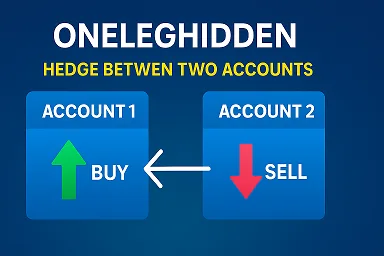
These algorithms open hedged (lock) BUY and SELL positions on one account or across two accounts and keep them open for a set time. They suit brokers whose terms allow hedging and require a minimum trade duration; check both before you use them. Remote trades two accounts as one strategy while each account runs on its own VPS, next to its own broker.
Minimum lots
Trading with the minimum lot is a calm long-term approach: brokers rarely apply restrictive plug-ins to minimum-lot trading, which they usually reserve for maximum lots and maximum leverage.
If a broker has restricted your account
Brokers do not allow one person to open several accounts under the same name to get round restrictions, so do not reopen an account with the same broker after it has applied plug-ins or limits to yours. Withdraw your balance, keep your statements and continue with another broker whose terms fit your strategy. Westernpips Private 7 moves your settings to a new account in minutes, and you can test the new broker in the Back Tester first.
Trading a friend’s or partner’s account
Many Westernpips clients trade together with friends, family or partners. Do it openly: the account is opened by the owner in their own name, with their own documents and money, and the owner decides to let you trade it. Most brokers allow this through an official trading authorisation, a limited power of attorney (LPOA), or through MAM or PAMM accounts; ask the broker which option it offers and register it, so the broker knows who places the trades. Agree the terms in writing, and keep the owner in control of deposits and withdrawals. You can trade the account on your own VPS, or move your licence to the owner’s VPS: on request we change the licence to the new server’s IP address, and the software works there. Do not use a friend’s account to return to a broker that has restricted your own account: brokers treat that as getting round their rules. Westernpips Private 7 trades such accounts like any other, and Remote can run them on separate VPS.
Agree conditions with the broker’s manager
Many broker managers are interested in profitable clients who bring large trading volume, and many already know this type of trading. Ask them about the maximum lot and the daily volume that suit your account, so it stays stable over the long term. Like in any business, good relationships and negotiation pay off.
Reliability
What if something goes wrong?
Automated trading needs a plan for technical problems. Prepare it before you go live:
- VPS restart or network loss. Orders already at the broker stay open. After a restart, check open positions in the broker terminal first, then restart Westernpips Private 7 and confirm all connections are green.
- Emergency stop. Know how to stop all algorithms at once in Westernpips Private 7 and how to close positions by hand in the broker terminal.
- Automatic protection. Keep Execution Control and the maximum slippage limits switched on, so trading pauses when execution degrades.
- Monitoring. Use your VPS provider’s uptime alerts and check the server from your phone through remote desktop.
- Backups. Save your settings and presets after every change, so you can move to a spare VPS in minutes.
- Help. Our support team works 24/7 and can connect to your server with you.
Time
How much time does it take? A daily and weekly routine
Plan a few days for set-up and first tests. After that, trading with Westernpips Private 7 is a working day: the trader sits at the computer at least during the European and American sessions and controls the process. Do not leave the software trading unattended for long: market conditions, broker execution and connections can change at any time, and only the trader can react to them correctly.
| When | What to do |
|---|---|
| During each session | Stay at the computer through the European and American sessions: watch open trades, execution time and slippage, follow the news, and pause or adjust algorithms when conditions change. |
| Every day | Before trading, check that the VPS, connections and algorithms are running; look at ping and execution time; read the trade log for errors, rejections and slippage; check the economic calendar for the day. |
| Every week | Review results per broker in the Analyzer; compare execution with previous weeks; adjust settings in the Back Tester; plan the week’s major news. |
| Every month | Withdraw profit by your rule; save statements; review which brokers and symbols to keep, add or drop. |
Avoid these
Twelve common beginner mistakes
- Leaving the software trading unattended instead of controlling it during the European and American sessions.
- Starting latency arbitrage without trading experience; have at least 3 months, better a year.
- Trading from a home computer instead of a VPS next to the broker.
- Putting the full capital into a broker before testing execution with the minimum lot.
- Setting the minimum gap smaller than spread plus commission.
- Choosing a VPS by price, not by ping to the broker and the quote source.
- Skipping the Back Tester and going live with untested settings.
- Not reading the broker’s terms about arbitrage, trade duration and hedging.
- Trading the late-evening rollover hour, when spreads are wide and brokers watch fast trades most closely.
- Increasing the lot too fast after the first good days.
- Waiting with the first withdrawal instead of testing it early.
- Buying “cracked” software from unofficial sellers.
The bigger picture
HFT firms and individual traders: where your chance is
On stock exchanges latency arbitrage is a race of large HFT firms. A study published by the UK Financial Conduct Authority found that on FTSE 100 shares such races happen about once a minute per stock, the winner is ahead by only 5–10 microseconds, and races make up about a fifth of trading volume. An individual trader cannot win that race.
The retail Forex and CFD market is different: many brokers take prices from their own providers, aggregate them and send them through their own servers, and their quotes can lag by milliseconds or more. That is the gap Westernpips Private 7 is built for: with a VPS next to the broker, a fast quote source and the right broker, an individual trader can work with delays that are thousands of times larger than on exchanges.
Learn more
Further reading
- Latency arbitrage explained
- High-frequency trading (HFT)
- Best forex arbitrage software 2026: platforms, EAs and custom code compared
- Latency arbitrage EA vs standalone platform
- What is an HFT trading platform? Why a broker is not one
- Triangular arbitrage in forex
- Crypto latency arbitrage
- Fast quote providers for latency arbitrage
- HFT infrastructure cost
- How to find the best broker for latency arbitrage
- VPS for arbitrage
- Latency arbitrage data study
- Westernpips FAQ: 140+ answers
- Westernpips Private 7 documentation
Lead Developer and Chief Technical Specialist at Westernpips. He works on Westernpips Private 7 and its BackTester and studies how long price gaps between fast feeds and broker quotes really last. The numbers in this guide on delays, broker differences and testing come from that work.
His working paper How Long Do Stale Quotes Last? measured stale-quote windows on XAUUSD at three retail brokers: median 34–56 ms, with the result depending on the broker and the order delay. It is a vendor study on our own recordings, with the full method published so anyone can repeat it.
Published on: SSRN · SocArXiv (OSF) · Zenodo · Code on GitHub
Profiles: Author page · ORCID · Google Scholar · SSRN · OSF
A note from the founder
Trading is a craft that rewards preparation, patience and a calm mind. Set clear, realistic goals, start small and grow step by step; in arbitrage, as in life, quiet and disciplined work is worth more than noise and emotions. And when success comes, share part of it with the people around you. We wish you steady progress and joyful trading with the programs of Westernpips.
Proof and technology
Real results and the technology behind them
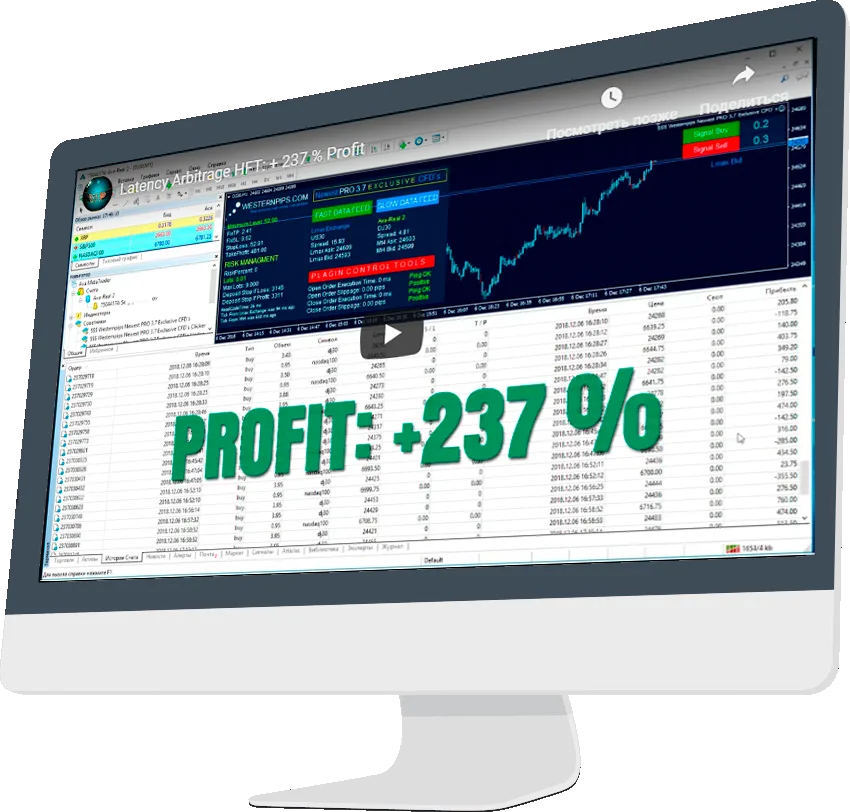
See live trading results
Explore live monitorings, statements and videos of Westernpips Private 7 trading on real accounts of Westernpips and of clients who trade their own money, and see how the strategies behave in real market conditions.
Technology at Westernpips
For more than 15 years Westernpips has developed low-latency arbitrage technology for private and professional traders. Our team works with the industry protocols ITCH, FIX, FAST and binary feeds and with direct market access to build fast connections and algorithms for Forex, CFDs, futures and crypto, so traders can act on the smallest price differences across markets.

The software for every step
Westernpips Private 7
HFT latency arbitrage software: a multi-terminal that connects fast data feeds, finds the moments when the broker price lags and trades them in milliseconds. Every step of this guide is built around it.
- Fast data feeds and direct TCP, FIX and API connections
- Many broker accounts from one multi-terminal
- Built-in Back Tester on recorded ticks
- Lifetime licence, free updates and 24/7 support
from $777 lifetime licence · one-time payment
How much money do I need to start latency arbitrage?
You can test a broker with a deposit of about $100 and the minimum lot. For a comfortable start, traders usually plan about $2,000 of trading capital, plus the Westernpips Private 7 licence from $777, a VPS from about $40 per month and the WP Fast Sources subscription after the free 90 days.
How long does it take to start earning?
Latency arbitrage needs trading experience: at least 3 months, better a year or more. Then allow time to learn the software, brokers and settings before you expect consistent results. Many clients run their first Back Tester tests and small live trades in the first days, with help from our support team.
Do I need a VPS?
Yes. Westernpips Private 7 should run on a Windows VPS in the same data centre as your broker, usually London (LD4) or New York (NY4), so that the ping is 0–10 ms.
How do I know if a broker is suitable for arbitrage?
Check three things: order execution time well below 1,000 ms, zero or minimal slippage, and a ping of 0–10 ms from your VPS. Westernpips Private 7 logs all three for every order, and the Back Tester shows the gaps on recorded ticks.
When is the best time for arbitrage trading?
During high volatility: major economic news and the opening of the European and American sessions, when broker quotes lag most often. Keep slippage limits and Execution Control switched on at these times.
Can I trade arbitrage within my broker’s rules?
Yes, if the broker’s terms allow it. Read the terms first and confirm your strategy with the broker in writing. Then set holding time, trade frequency and lot to match its rules: Westernpips Private 7 offers longer trade durations, hedged algorithms such as TwoLegLock for brokers that allow hedging, and minimum lots. Agree lot sizes and volume with the broker’s manager.
Ready to take the first step?
Choose your plan, and our team will help you install Westernpips Private 7, connect WP Fast Sources and test your first broker: Telegram @westernpips, the group Westernpips HFT Trading, e-mail westernpips@gmail.com or all official contacts.
Trading Forex, CFDs and crypto involves a high risk of losing money. Read the Risk Warning.


Online Support 24/7
If you have questions about Westernpips Software products please Contact Us.