


VPS guide for HFT traders
 VPS guide for HFT traders
Ultra-Low Latency Forex VPS for Arbitrage: Location, Ping and Setup
Latency arbitrage is won or lost in milliseconds, and the VPS decides how many of them you keep. This guide explains why a Forex VPS matters, where to place it between the broker and the fast quote server, how to test the ping, which configuration Westernpips Private 7 needs, which providers our clients use and how to set up and run the server every day.

By Alexander Vinsky, Lead Developer and Chief Technical Specialist at Westernpips · About the author
- Ping below 5 ms
- LD4 · NY4 · TY3
- 2 CPU · 2 GB RAM minimum
- 6-step setup
Why a VPS
Why a VPS Is Important for Arbitrage Trading

Short answer: arbitrage profits from price gaps that last only a few tens of milliseconds, and a VPS in the same data centre as the broker cuts the network delay from 20–150 ms on a home connection to about 1–5 ms. Without that, the gap usually closes before your order arrives.
Latency arbitrage lives in windows of a few tens of milliseconds: the time between a new price on a fast feed and the moment the broker updates its own quote. A home or office internet connection adds tens or hundreds of milliseconds on the way to the broker, and part of every window is lost before the order even arrives. A virtual private server (VPS) in a data centre next to the broker removes most of that delay, and it runs Westernpips Private 7 on a stable network and power supply.
With a well-placed VPS you get:
- Faster execution: orders reach the broker in a few milliseconds instead of tens or hundreds.
- Less slippage: the order arrives while the price you saw is still there.
- Fewer requotes and rejections caused by a price that has already moved.
- Every tick on time: fast quotes and broker quotes reach the software without gaps, so the gap you see is the real one.
- Stable operation: a data-centre connection does not drop when your home network or electricity does.
- Room to grow: one server can run several broker terminals, fast feeds and the Back Tester at the same time.
In our data study of three brokers the median stale-quote window on XAUUSD was only 34–56 ms. Every millisecond of your own delay comes out of that window, which is why the VPS is the first piece of infrastructure to get right.
Latency and ping
Ultra-Low Latency VPS: Ping, Latency and Execution Time to Measure
Latency is the time a signal needs to travel from your trading software to the broker and back. Three numbers describe it in practice:
| Number | What it shows | Target from a good VPS |
|---|---|---|
| Ping to the broker server | Network distance to the broker’s trade server | below 5 ms; above 10 ms results usually drop |
| Ping to the fast quote server | How quickly the fast price reaches you | as low as possible, ideally a few ms |
| Order execution time | From sending the order to its confirmation, including the broker’s own processing | a few to tens of ms |
Ping depends on your VPS. Execution time also depends on the broker: a slow or overloaded broker stays slow even from the best server. Westernpips Private 7 shows the ping to every server and logs the execution time and slippage of every order, so you can see which part of the delay is yours and which is the broker’s.
How distance turns into milliseconds
An ultra-low latency VPS is not a special kind of server: it is an ordinary fast server placed as close to the broker as possible. Light in optical fibre travels at about two-thirds of its speed in a vacuum, roughly 200 km per millisecond, so every 100 km of cable adds about 1 ms to the round trip before any router or server delay. Typical round-trip times look like this:
| Where the VPS is | Typical ping to the broker | Fit for latency arbitrage |
|---|---|---|
| Same data centre (cross connect) | below 0.5 ms | Best: dedicated low-latency servers |
| Same city, another data centre | about 0.5–2 ms | Good: standard Forex VPS |
| Neighbouring hub (London – Frankfurt, New York – Chicago) | about 8–20 ms | Weak: most of the price window is lost |
| Across the Atlantic (London – New York) | about 65–80 ms | Not suitable |
| Europe – Asia (London – Singapore or Tokyo) | about 160–250 ms | Not suitable |
| Home or office internet | about 20–150 ms, with jumps | Only for learning the software |
These are typical values, not guarantees: the real route depends on the provider’s network, so always measure from the server itself. A VPS reduces latency in three ways: it shortens the physical distance, it replaces Wi-Fi and a home router with a wired data-centre network, and it keeps a stable connection that does not drop during news or busy session opens.
Where to place it
Where to place your VPS: the broker and the fast quotes

Latency arbitrage compares two prices: the fast quote and the broker quote. That is why the VPS location depends on two servers, not one:
- Same city for both. If the broker server and the fast quote server are in the same data centre or city, place the VPS there. Most Forex brokers and fast feeds are in London (LD4) or New York (NY4), so these are the usual choices.
- Different cities. If the broker is in one city and the fast quote source in another, choose the city of the broker or a location halfway between them, and compare both options with real ping tests.
- Brokers in Asia. For brokers with servers in Tokyo (Equinix TY3), Singapore (SG1) or Hong Kong (HK1), rent the VPS in the same city.
- Your own location does not matter. If you live in Asia but your broker trades from London, rent the VPS in London: you only connect to it by Remote Desktop, and the orders travel from the VPS, not from your computer.
| Broker server | Fast quotes | Where to put the VPS |
|---|---|---|
| London LD4 | London | London, as close to LD4 as possible |
| New York NY4 | New York | New York / New Jersey |
| New York | London | Test New York and a halfway point; choose the lower total delay |
| Tokyo, Singapore, Hong Kong | Asia or Europe | The broker’s region; check the ping to the fast feed |
Where the broker server is: look at the server name in the terminal, ask the broker’s support, or measure the ping from test servers in several cities. The broker guide explains how to test the broker itself.
Test the ping
How to test the ping before you pay for a month
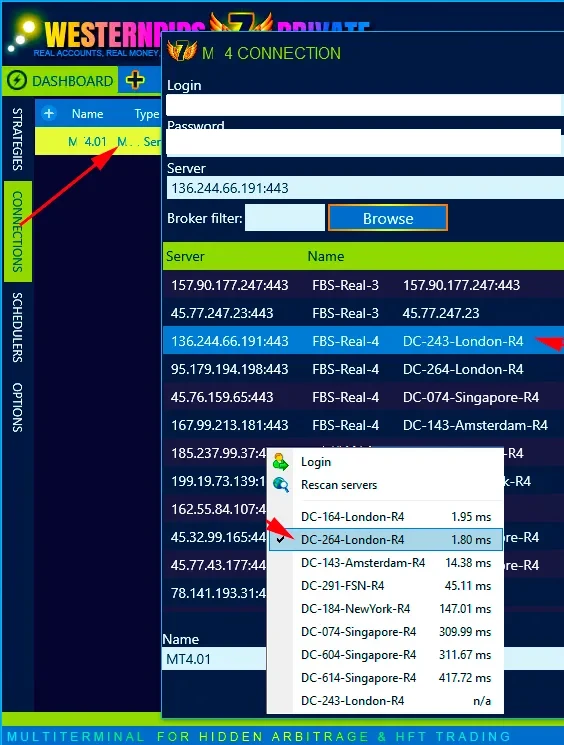
Do not choose a VPS from its advertising. Rent the smallest plan for a few days or a month in the candidate location and measure:
- Install Westernpips Private 7 and add your broker account. In the server list the software shows the ping to every broker server: choose the one with the lowest value.
- Check the fast feeds. Look at the ping to the fast quote servers you will use.
- Watch it during the day. Ping and execution can change at the London and New York opens and around news. Note the values in quiet and busy hours.
- Place a few test orders with the minimum lot and compare the execution time and slippage in the log.
- Compare locations. If the result is not good enough, try another city or provider before you sign a longer contract.
VPS requirements
VPS requirements for Westernpips Private 7
| Parameter | Minimum | Recommended |
|---|---|---|
| Operating system | Windows Server | Windows Server 2012 or 2016 |
| CPU | 2 cores | 4 cores, high clock speed |
| RAM | 2 GB | 4–8 GB for several terminals |
| Disk | 50 GB | SSD or NVMe, 50–100 GB |
| Location | Broker’s city | Same data centre as the broker and the fast quotes |
| IP address | One fixed IP | A separate VPS and IP for each account in two-leg trading |
Windows Server 2012 and 2016 are preferred: they run the trading terminals and Westernpips Private 7 smoothly without the extra background services of newer versions. A higher CPU clock helps more than many slow cores, and each additional broker terminal needs extra RAM. The full list of system requirements is in the documentation.
VPS providers
VPS providers our clients use
Any reliable provider with servers in the right data centre will do. These three are popular with Westernpips clients; compare their current plans and locations yourself and test the ping before you commit.
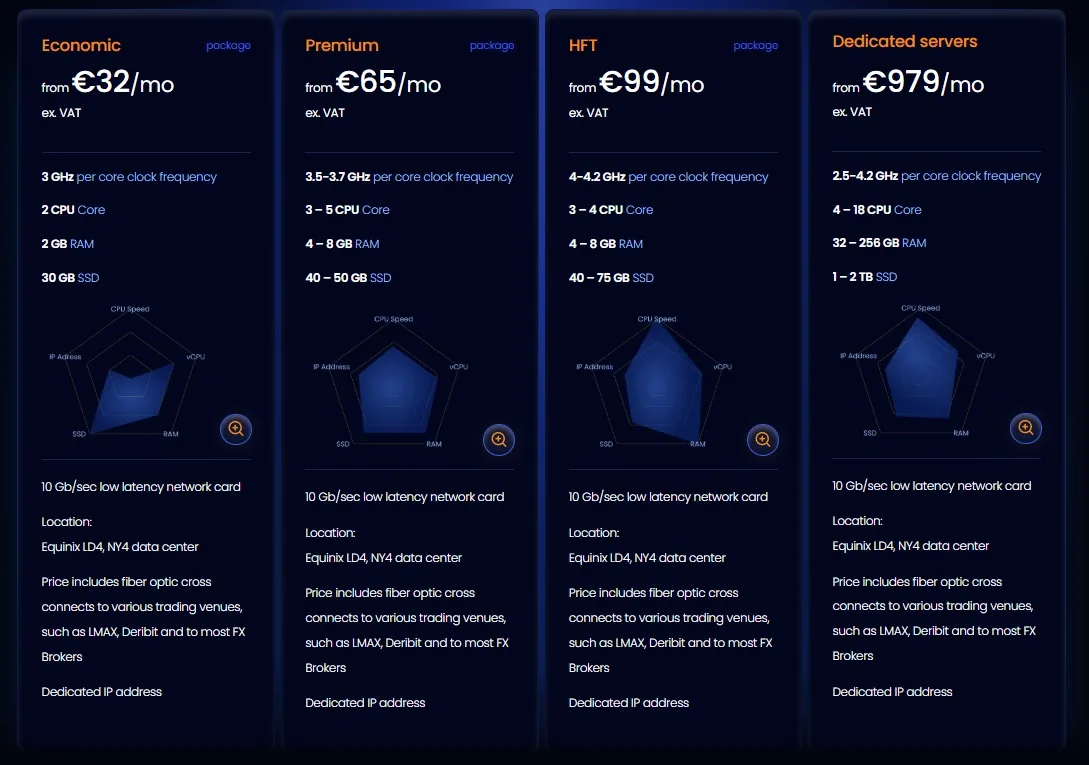
UltraFX VPS
Dedicated HFT servers in Equinix LD4, London
For latency-critical strategies: dedicated servers in London with Linux or Windows, available in limited numbers by prior arrangement, and a cross connection to the Westernpips servers.
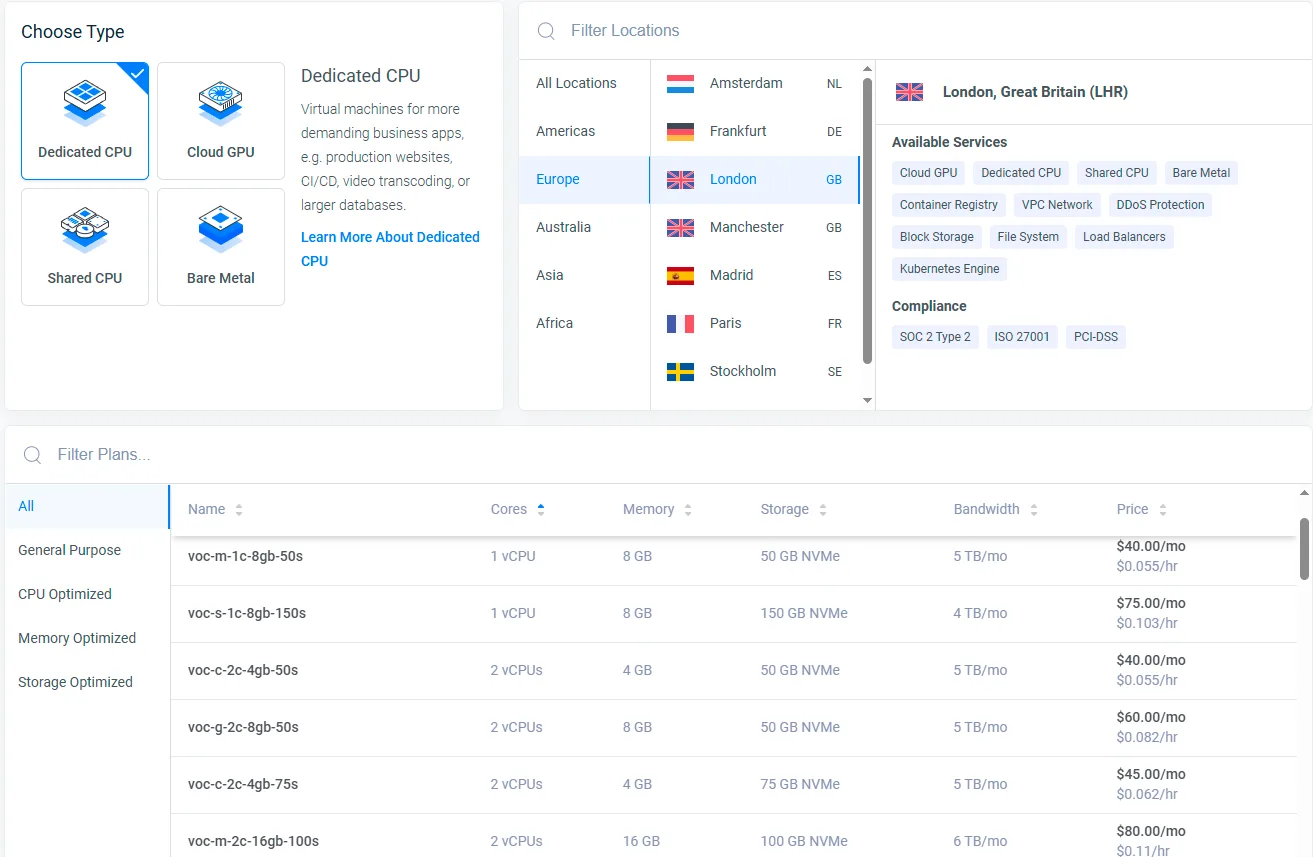
Vultr
Cloud and bare-metal servers worldwide
Global cloud infrastructure with virtual CPUs, dedicated CPUs and bare metal in many cities, including London, New York, Tokyo and Singapore. Convenient for testing several locations.
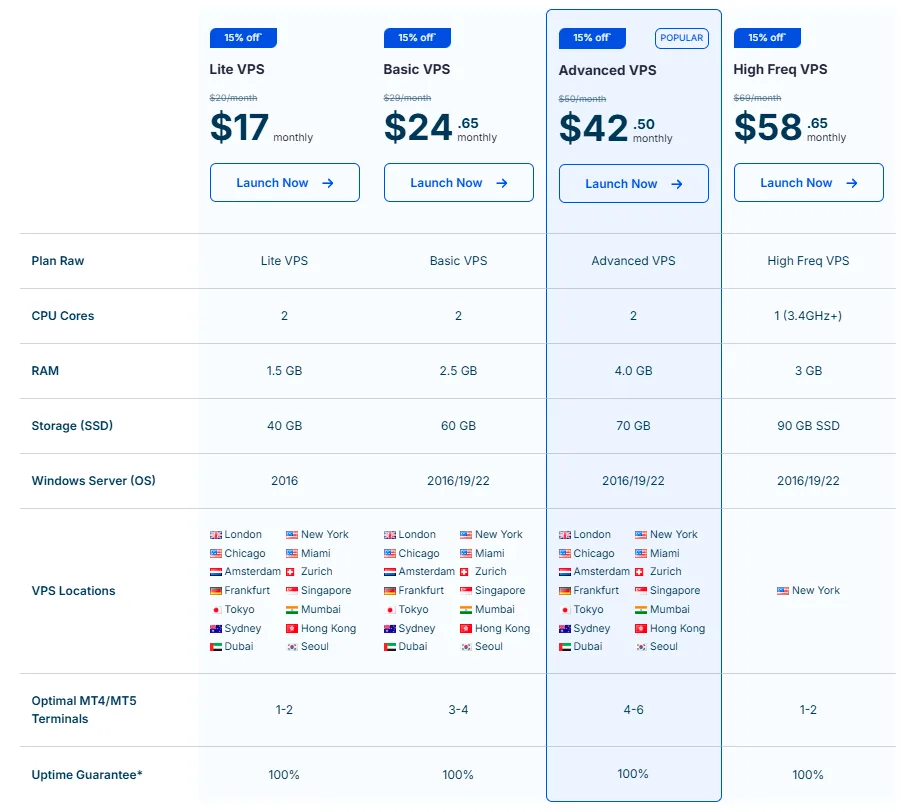
FXVM
Forex VPS in Equinix data centres
Windows VPS built for trading platforms and expert advisors, with locations in Equinix IBX data centres in New York, London and other financial hubs.
Links to providers are partner links. Prices and plans are set by the providers and change over time.
Set up
How to set up a VPS for latency arbitrage
- Rent the VPS in the location you tested, with Windows Server and enough RAM for your terminals.
- Connect with Remote Desktop and set Windows updates to install outside your trading hours, so the server does not restart in the middle of a session.
- Install Westernpips Private 7 and send the VPS IP address to our support team: the licence is linked to this IP.
- Add your broker accounts and fast feeds, choose the server with the lowest ping and record quotes before you trade.
- Start with the minimum lot, check execution and slippage in the log, and switch on Execution Control so trading pauses if execution gets worse.
- For two-leg trading with Remote, run each account on its own VPS with its own IP address; the Remote algorithm of Westernpips Private 7 connects the two servers.
Moving to another server. If you change the VPS, for example to follow a new broker, or trade on a partner’s or investor’s account through LPOA, MAM or PAMM on their VPS, write to support and we will move the licence to the new IP.
Daily routine
Working with a VPS every day
A VPS keeps the software running, but latency arbitrage is not a set-and-forget robot. Plan to be at your computer at least during the European and US sessions and keep an eye on the process:
- Check ping, execution time and slippage at the start of each session.
- Watch the account around major news and the session opens.
- Restart the terminals and the VPS at a quiet time, not during trading.
- Keep an eye on free RAM and CPU load when you add terminals.
- Withdraw profits regularly and review the logs weekly.
We recommend at least three months of trading experience, and ideally a year or more, before you work with latency arbitrage on a live account. The getting-started guide walks through the full routine.
Risk warning. A fast VPS improves execution but does not guarantee profit. Results depend on the broker, its execution and rules, market conditions and settings, and you can lose money. Read the Risk Warning.
Checklist
Forex VPS checklist
- VPS close to the broker and the fast quote server, or halfway between them
- Ping to the broker below 5 ms, checked in quiet and busy hours
- Windows Server 2012 or 2016, 2+ CPU cores, 2+ GB RAM, 50 GB disk
- Windows updates scheduled outside trading hours
- Licence activated on the VPS IP address
- Quotes recorded and test orders checked in the log
- Execution Control switched on
- A separate VPS and IP for each account in two-leg trading
Lead Developer and Chief Technical Specialist at Westernpips. He works on Westernpips Private 7 and its BackTester and studies how long price gaps between fast feeds and broker quotes really last. The numbers in this guide on delays, broker differences and testing come from that work.
His working paper How Long Do Stale Quotes Last? measured stale-quote windows on XAUUSD at three retail brokers: median 34–56 ms, with the result depending on the broker and the order delay. It is a vendor study on our own recordings, with the full method published so anyone can repeat it.
Published on: SSRN · SocArXiv (OSF) · Zenodo · Code on GitHub
Profiles: Author page · ORCID · Google Scholar · SSRN · OSF

The software for your VPS
Westernpips Private 7
HFT latency arbitrage software: a multi-terminal that connects fast data feeds, finds the moments when the broker price lags and trades them in milliseconds. It shows the ping to every server, logs execution and slippage and runs on any Windows VPS.
- Fast data feeds and direct TCP, FIX and API connections
- Many broker accounts from one multi-terminal
- Built-in Back Tester on recorded ticks
- Lifetime licence, free updates and 24/7 support
from $777 lifetime licence · one-time payment
Do I need a VPS for latency arbitrage?
Yes. A home or office connection adds tens or hundreds of milliseconds of delay, which is longer than most price windows. A VPS in the broker’s data centre keeps the delay at a few milliseconds and runs Westernpips Private 7 around the clock on a stable network.
Which operating system should I choose for the VPS?
Windows Server. Versions 2012 and 2016 are preferred for the best performance; newer versions add background services that can slow trading down.
Which server location should I choose?
Most Forex brokers have their servers in London, so London is the usual first choice. If your broker is in New York, choose New York; if it is in Singapore or Tokyo, choose that region. Always check the ping to both the broker and the fast quote server.
Can I use my home computer to trade with Westernpips software?
Only to learn the software. From a home PC the ping to the broker and to the quote provider is usually far too high for live latency arbitrage. The exception is a computer located very close to the broker’s data centre, for example in London or New York.
What is ping and why is it important?
Ping is the round-trip time from your server to the broker or quote provider. A lower ping means your order arrives sooner, while the price you saw is still available. For arbitrage, aim for less than 5 ms to the broker.
How can I reduce latency in Forex trading?
Use a VPS close to your broker’s server, choose a broker with fast execution and direct market access, use the broker server with the lowest ping, and run fast, optimised software such as Westernpips Private 7 with direct TCP or FIX connections.
Where should my trading VPS be located?
As close as possible to both the broker trade server and the fast quote server, or halfway between them. Most Forex brokers host their servers in London (LD4), New York (NY4) or Tokyo (TY3). Before you pay for a month, measure the ping to both servers from a test VPS.
What VPS configuration do I need?
At least 2 CPU cores, 2 GB RAM and a 50 GB disk with Windows Server. For several broker terminals choose 4 cores and 4–8 GB RAM on an SSD or NVMe disk.
Can I move my Westernpips licence to another VPS?
Yes. The Westernpips Private 7 licence is linked to the IP address of your VPS. If you change servers, for example to move closer to a new broker or to run the software on the VPS of a partner who gave you access to their account through LPOA, MAM or PAMM, write to our support team and we will move the licence to the new IP.
Do I need two VPS servers for two-leg arbitrage?
For the Remote algorithm, yes: each account runs on its own VPS with its own IP address, and Westernpips Private 7 connects the two servers. Other algorithms can run several accounts on one VPS.
How much does a Forex VPS cost?
A standard Windows VPS in London or New York usually costs from about 20 to 70 US dollars a month, depending on CPU, RAM and location. Dedicated low-latency servers cost more. The VPS is paid to the provider, separately from the Westernpips licence.
How does a Forex VPS reduce latency?
It moves your trading software next to the broker. The order travels a few kilometres inside one city instead of hundreds or thousands of kilometres from your home, over a wired data-centre network without Wi-Fi or a home router. Ping falls from 20–150 ms to about 1–5 ms.
I am in Asia: which VPS location gives the lowest trading latency?
The location of your broker’s trade server, not your own. If the broker is in Tokyo, Singapore or Hong Kong, rent the VPS there; if it is in London or New York, rent it in London or New York. You control the VPS by Remote Desktop, and the extra delay between you and the VPS does not affect your orders.
How do I run a Forex VPS latency test?
Rent the smallest plan in the candidate city for a few days, open Westernpips Private 7 or your trading terminal on the VPS and read the ping to the broker’s servers. Repeat in quiet hours, at the London and New York opens and around news, then place a few minimum-lot orders and compare execution time and slippage in the log.
What latency does a trading server need for arbitrage?
For latency arbitrage, a ping to the broker below 5 ms, ideally below 1–2 ms, and a ping to the fast quote server of a few milliseconds. Above 10 ms results usually drop. Regular manual or swing trading works well with 20–50 ms.
Is a low-latency VPS useful for news trading?
Yes. Prices move fastest in the first seconds after a release, and a VPS near the broker gets your order in before most of that move. Slippage and wider spreads during news still apply; see our news trading guide.
Need help choosing a VPS?
Tell us your broker and we will help you pick the location and set up Westernpips Private 7 on the server. Our team answers 24/7: Telegram @westernpips, e-mail westernpips@gmail.com or all official contacts.
Trading Forex, CFDs and crypto involves a high risk of losing money. Read the Risk Warning.


Online Support 24/7
If you have questions about Westernpips Software products please Contact Us.