


Broker selection guide
 Broker selection guide
How to Find the Best Broker for Latency Arbitrage
The broker decides whether latency arbitrage works. This guide to choosing an arbitrage-friendly Forex broker explains what makes a broker good for arbitrage, ECN, STP and market-maker models, platforms and regulation, the latency, ping and slippage numbers to check, the questions to ask, where to find candidates and how to test and keep a good broker with Westernpips Private 7.

By Alexander Vinsky, Head of Research at Westernpips · About the author
- 5 broker qualities
- 6 metrics to check
- 5 questions to ask
- 2-week test plan
What makes a good broker
What makes a broker good for latency arbitrage
Whether you call it a latency arbitrage broker, an arbitrage-friendly broker or an HFT broker, you are looking for the same thing. Latency arbitrage catches a short-lived price gap between a fast data feed and a broker’s slower quote. The strategy and the software give you the method; the broker decides whether the method can work. The wrong broker can erase your edge through slow execution and slippage, or restrict your account. The right one lets Westernpips Private 7 keep most of every gap.
A good broker for arbitrage combines five things:
- Lagging quotes: its prices on your symbols regularly fall behind the fast feed by more than your costs.
- Fast, stable execution: orders are filled in milliseconds, not seconds.
- Low and fair slippage: fills close to the requested price, with positive and negative slippage in balance.
- Low trading costs: tight spreads and a reasonable commission.
- Terms that fit your strategy: clear rules on trade duration, hedging and automated trading, and reliable withdrawals.
ECN, STP and market makers
Execution models: ECN, STP and market makers
How a broker handles your orders decides how it treats fast, profitable trading.
| Model | How it works | For arbitrage |
|---|---|---|
| ECN | Orders go to a network of liquidity providers; the broker earns a commission. | Usually the best choice: fast execution, fewer restrictions. |
| STP | Orders are passed straight through to liquidity providers, without a dealing desk. | Good, if execution is fast and the terms allow your style. |
| Market maker (B-book) | The broker takes the other side of client trades. | Often limits consistent short-term profits with plug-ins, requotes or wider spreads. |
| Hybrid | Some clients are passed on (A-book), others kept in-house (B-book). | Depends on how your account is classified; test carefully. |
The label on the website is not a guarantee: a broker that calls itself ECN can still apply restrictions. Always read the terms and test execution with small trades before you commit.
Latency, ping, slippage
Latency, ping and slippage: the numbers that matter
Every millisecond counts. Ideally the ping from your VPS to the broker’s server stays below 5 ms; above 10 ms the effectiveness of latency arbitrage drops sharply. That is why traders rent a VPS in the broker’s data centre, often London (LD4) or New York (NY4), and close to the fast quote source as well.
Slippage is the difference between the requested price and the fill price. Even a perfect signal turns into a loss if slippage eats the gap. Look for a broker where the gap between the fast feed and the broker’s execution stays large enough to cover the spread, commission and slippage, and still leave a profit.
Execution time is the time from sending an order to its confirmation. If orders take more than a second, the broker is too slow or has already applied protective measures to your account. Westernpips Private 7 logs the execution time and slippage of every order, and its Execution Control settings stop trading automatically when execution exceeds your limit.
| Metric | Good sign | Warning sign |
|---|---|---|
| Ping from VPS | below 5 ms, stable | above 10 ms or jumping |
| Execution time | a few to tens of ms | above 1,000 ms or rising |
| Slippage | near zero, balanced | almost always against you |
| Rejections and requotes | rare | frequent, mostly on winning trades |
| Spread you pay | as quoted | wider than on the chart |
| Withdrawals | processed on time | delays and extra checks |
Platforms and connections
Trading platforms and connection types
The platform decides how Westernpips Private 7 connects to the broker and which plan you need:
| Broker platform | Connection in Westernpips Private 7 | Plan |
|---|---|---|
| M4 platform | Direct TCP connection or the EA Connector | WP Silver and higher |
| M5 platform | Direct TCP connection or the EA Connector | WP Gold and higher |
| cTrader | cTrader FIX | WP Gold and higher |
| FIX, API and ITCH venues | 36 connectors to liquidity providers, aggregators and exchanges | WP Platinum |
| Web terminals only | Westernpips WebClick | WP Fast Sources subscription |
Check which platforms and account types the broker offers before you open an account, and choose the server closest to your VPS. If a broker only offers a web terminal, Westernpips WebClick can trade it.
Regulation and safety of funds
Regulation and the safety of your funds
Arbitrage-friendly execution is worthless if you cannot withdraw your money. Before you deposit, check the broker as a company:
- Licence: which regulator licenses the broker, and can you find the licence number in the regulator’s own public register?
- Client money: are client funds kept in segregated accounts, and is there negative balance protection?
- Track record: how long has the company operated, and what do traders report about withdrawals?
- Payments: which deposit and withdrawal methods are offered, with what fees and processing times?
- Your country: is the broker allowed to accept clients from your country of residence?
Stricter regulators protect clients better, but some also limit leverage or certain trading styles. Weigh both sides, and never deposit more than you can afford to lose with a single broker.
Where to find brokers
Where to find candidate brokers
The broker landscape changes quickly: new companies open, others close, and policies change. Westernpips does not provide broker lists or recommendations: you choose and test brokers yourself. Keep a shortlist and refresh it regularly:
- New brokers. Newly launched brokers are worth testing early: their pricing and execution infrastructure is often still developing, and their quotes may lag more than those of established firms.
- Real results. The Westernpips Myfxbook monitorings show 144 live accounts and the brokers they traded with; independent monitoring statistics show real execution and results instead of marketing claims.
- Trading communities. Forums and trader groups, including the Westernpips Telegram group, share which brokers currently work and which to avoid. Use them as hints, not as a replacement for your own tests.
- Broker ratings and advertising. Broker comparison sites, rating lists and broker advertising show which companies are active and what account types they offer. Use them to build your shortlist, then let your own tests decide.
What our research shows
What our research shows about broker differences
Brokers differ much more than their advertising suggests. In the Westernpips study How Long Do Stale Quotes Last?, Alexander Vinsky measured how long XAUUSD quotes at three retail brokers stayed behind a fast feed. The median stale-quote window was 34–56 ms, and how much of it a trader could use depended on the broker and on the order delay.
Two lessons follow for choosing a broker: the same strategy can work at one broker and not at another, and every millisecond of your own delay reduces what you can capture. That is why this guide asks you to measure each broker yourself instead of trusting lists and ratings.
Questions to ask the broker
Questions to ask the broker before you deposit
A short written question to the broker’s support or manager saves weeks of testing and gives you a record of the answer. For example:
Hello, I plan to trade with an automated multi-terminal (expert advisors / FIX) on an ECN account. Could you confirm: 1) Are automated trading and short-term trades allowed, and is there a minimum trade duration? 2) Are hedged positions allowed on one account or between accounts? 3) Which server and data centre should I connect to? 4) What is the typical execution time and is there a maximum number of orders per day? 5) What are the withdrawal methods and processing times? Thank you.
Keep the answer with your records. If the broker avoids clear answers, treat that as a warning sign.
How to test a broker
How to test a broker step by step
However good a broker looks on paper, only testing shows if it works for arbitrage.
- Read the terms. Look for clauses on latency arbitrage, minimum trade duration, hedging, expert advisors and “abusive trading”. If anything is unclear, ask the broker in writing and keep the answer.
- Check the quotes. Record the broker’s quotes with Westernpips Private 7, on demo first if its prices match the live server, and look at the gaps in the Back Tester and Analyzer.
- Open a small live account. Demo servers often run with different settings, so real execution must be tested with real money. A small deposit and the minimum lot are enough.
- Trade for about two weeks, including at least one major news release, and log ping, execution time, slippage, rejections and requotes.
- Make a test withdrawal early to see how the broker processes payments.
- Compare and decide. Keep brokers that pass, increase the volume gradually, and drop those that do not.
Red flags
- No licence you can verify in a regulator’s register, or vague company details.
- Terms that allow the broker to cancel profitable trades without clear criteria.
- Execution that is fine on demo but much slower or worse on live.
- Slippage almost always against you, or frequent rejections of winning trades.
- Delayed withdrawals or new documents requested only after profits.
- Pressure to deposit more or bonuses with withdrawal conditions.
Testing several brokers in parallel, each with a small deposit, quickly shows where execution is smoothest. The getting-started guide shows these checks with screenshots of Westernpips Private 7.
Keep a good broker
How to keep a good broker for longer
Once you start earning consistently, some brokers may react: plug-ins on your account, artificial delays, wider spreads, or slower withdrawals. Plan for it from the first day:
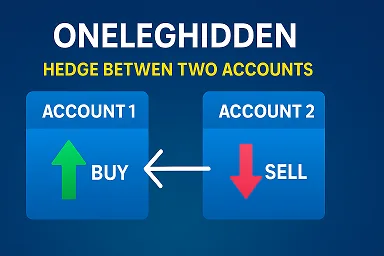
- Trade within the rules. Set holding time, lot size and trading frequency to fit the broker’s terms. For brokers that do not accept very short one-leg trades, use the TwoLegLock and OneLegHidden algorithms of Westernpips Private 7.
- Mix your trading. Add manual trades or other strategies to lower the share of latency trades in your account.
- Withdraw regularly and keep accounts modest in size instead of letting a large balance build up.
- Diversify across several brokers, so one broker’s changes affect only part of your trading.
- Talk to the broker’s manager about acceptable lot sizes and volume.
- Watch the numbers. If execution time or slippage suddenly rises, pause trading and review the account.
If a broker restricts your account, do not reopen with the same broker; withdraw your balance and continue with another broker whose terms fit your strategy. More in the FAQ on brokers and arbitrage.
Risk warning. A suitable broker improves execution but does not guarantee profit. Results depend on the broker, its execution and rules, latency, market conditions and settings, and you can lose money. Brokers can change their conditions at any time. Read the Risk Warning.
Checklist
Broker checklist
- ECN or STP account with direct liquidity access and low spreads
- Terms checked for latency arbitrage, trade duration, hedging and EAs
- VPS in the broker’s data centre, ping below 5 ms
- Quotes recorded and gaps checked in the Back Tester
- Two weeks of live tests with the minimum lot, including news
- Execution time, slippage and rejections within the good range
- Test withdrawal processed on time
- Settings matched to the broker’s rules; Execution Control switched on
- Regular withdrawals and several brokers in use
Finding the best broker is not a one-time task but a continuous process: new brokers appear, old ones change their rules, and market conditions shift. Stay flexible, keep testing and let the numbers decide.
Head of Research at Westernpips. He works on Westernpips Private 7 and its BackTester and studies how long price gaps between fast feeds and broker quotes really last. The numbers in this guide on delays, broker differences and testing come from that work.
His working paper How Long Do Stale Quotes Last? measured stale-quote windows on XAUUSD at three retail brokers: median 34–56 ms, with the result depending on the broker and the order delay. It is a vendor study on our own recordings, with the full method published so anyone can repeat it.
Published on: SSRN · SocArXiv (OSF) · Zenodo · Code on GitHub
Profiles: Author page · ORCID · Google Scholar · SSRN · OSF

The software for testing brokers
Westernpips Private 7
HFT latency arbitrage software: a multi-terminal that connects fast data feeds, finds the moments when the broker price lags and trades them in milliseconds. It records broker quotes, measures execution and slippage and adapts to each broker’s rules.
- Fast data feeds and direct TCP, FIX and API connections
- Many broker accounts from one multi-terminal
- Built-in Back Tester on recorded ticks
- Lifetime licence, free updates and 24/7 support
from $777 lifetime licence · one-time payment
What is the best broker for latency arbitrage?
There is no single best broker for everyone: conditions change and differ by country and account type. Look for an ECN or STP account with fast, stable execution, low and fair slippage, tight spreads, a server you can reach with a nearby VPS, and terms that fit your strategy. Then confirm it with your own tests.
Do brokers allow latency arbitrage?
Rules differ. Some brokers accept arbitrage and high-frequency trading, others limit very short trades or certain strategies in their terms. Read the terms before you start; for brokers with such rules Westernpips Private 7 offers the TwoLegLock and OneLegHidden algorithms.
Can I test a broker on a demo account?
Use demo only for a first look at the quotes. Many brokers run demo servers with different execution settings, so test execution, slippage and withdrawals on a small live account with the minimum lot.
What ping and execution time are good for arbitrage?
A ping below 5 ms from your VPS to the broker’s server is ideal; above 10 ms results usually drop. Execution time should be a few to tens of milliseconds; more than 1,000 ms means the broker is not suitable.
How many brokers should I use?
Several. Testing a few brokers in parallel finds good conditions faster, and spreading trading across brokers means one broker’s changes affect only part of your results.
Which brokers allow latency arbitrage and HFT?
Westernpips does not publish broker lists. Rules differ by broker and change over time, so check each broker’s terms, ask in writing whether automated and short-term trading is allowed, and confirm it with your own tests.
Is a regulated broker important for arbitrage?
Yes. Regulation, segregated client funds and a reliable withdrawal history protect your money. Some strict regulators also limit leverage or trading styles, so check both the protection and the rules before you deposit.
Which platform is best for latency arbitrage?
It depends on the broker. Westernpips Private 7 connects to M4 and M5 platform brokers, cTrader through FIX and, on WP Platinum, to FIX, API and ITCH venues. FIX connections are usually the fastest; M4/M5 accounts are the most common start.
Why are ECN and STP brokers better for arbitrage?
They pass orders to liquidity providers and earn on commission, so they usually execute faster and have fewer restrictions. Market makers take the other side of client trades and are more likely to limit consistent short-term profits.
Test your next broker with Westernpips Private 7
Record quotes, measure execution and slippage and find the brokers that work for you. Our team helps 24/7: Telegram @westernpips, e-mail westernpips@gmail.com or all official contacts.
Trading Forex, CFDs and crypto involves a high risk of losing money. Read the Risk Warning.


Online Support 24/7
If you have questions about Westernpips Software products please Contact Us.