

Latency arbitrage for Web Traders
 Latency arbitrage for Web Traders
Westernpips WebClick: One Click Trading on Web Platforms
One click trading on autopilot, built for latency arbitrage where there is no trading API. WebClick reads Westernpips fast quotes and clicks Buy, Sell and Close on the broker’s one-click Web Trader the moment its price falls behind.
- Trading API needed
- None
- Platforms on full auto
- 12
- Universal Clicker
- Any site
- Click points per action
- Up to 3
- Agent on your VPS
- Windows
- Free for Private 7 owners
- Included
Overview
One click trading on autopilot: fast quotes in, clicks out
Many brokers give clients only a web trading platform with one click trading: a Web Trader or web terminal with no FIX, no API and no expert advisors. Their web prices still lag the market by milliseconds. WebClick turns that lag into trades: it compares the Westernpips fast feed with the Web Trader price and, when the gap is large enough, presses Buy, Sell and Close in the browser exactly as a trader would.
-
Fast quotes first
Westernpips fast quotes reach your VPS before the broker’s Web Trader updates, so every signal starts with a speed advantage.
-
Real clicks, no API
The agent presses the platform’s own Buy, Sell and Close buttons in Chromium. It works where a trading API is missing or blocked.
-
Any one-click platform
Twelve Forex, CFD, crypto and binary options Web Traders on full auto, plus the Universal Clicker for any other one-click site.
-
Full control from the panel
Settings, Start and Stop, logs, order history and agent updates in the web panel; execution on your own Windows VPS.
Westernpips WebClick is latency arbitrage software for broker Web Traders that have no trading API. A Windows agent on the trader’s VPS compares Westernpips fast quotes with the price on the broker’s web trading platform (Web Trader or web terminal) and clicks the one click trading buttons Buy, Sell and Close in Chromium when the gap passes the trader’s threshold. It trades on full auto on CMC Markets, M5 Web, M4 Web, Trade Nation, Exness Web, IG, Plus500, MEX / MultiBank, Bybit, EXANTE, IQ Option and Quotex, and a Universal Clicker for any one-click platform. It is controlled from the web panel at my.westernpips.com/webclicker. WebClick costs $150 per month, the fee for the WP Fast Sources quotes it runs on, and is included at no extra cost for Westernpips Private 7 owners who pay for WP Fast Sources (plans and prices). The licence covers one VPS or PC. Results depend on the broker and are not guaranteed.
Latency arbitrage
How WebClick trades the lag on a web terminal
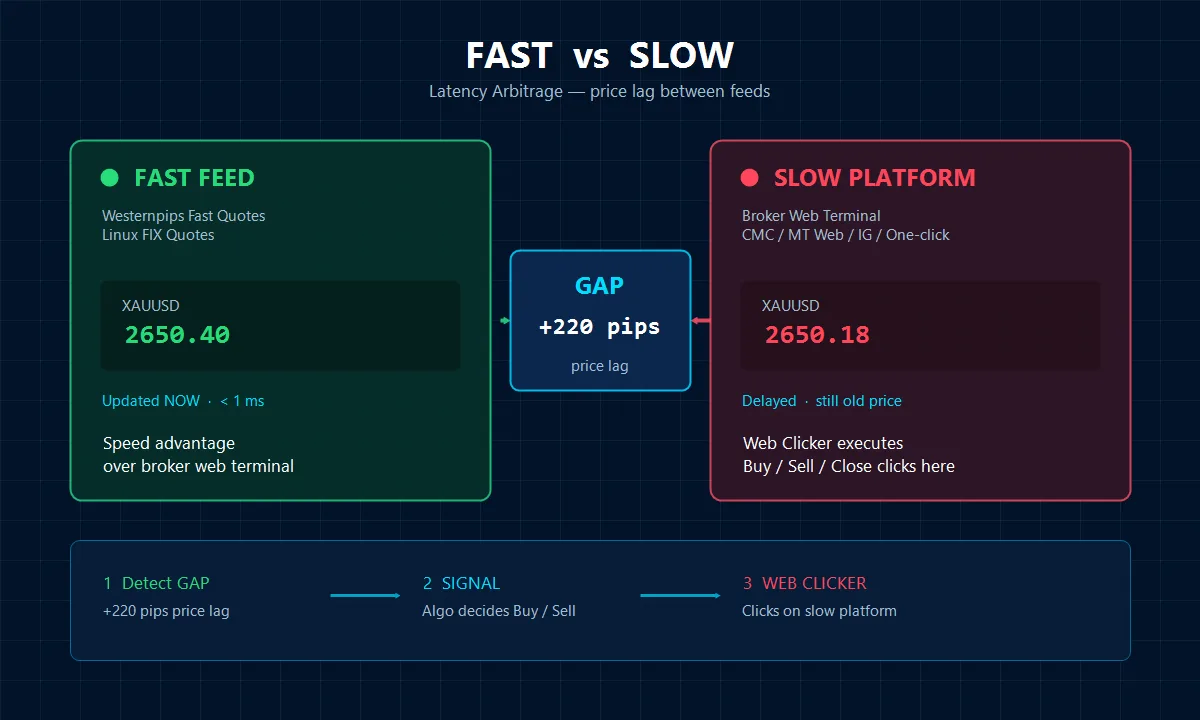
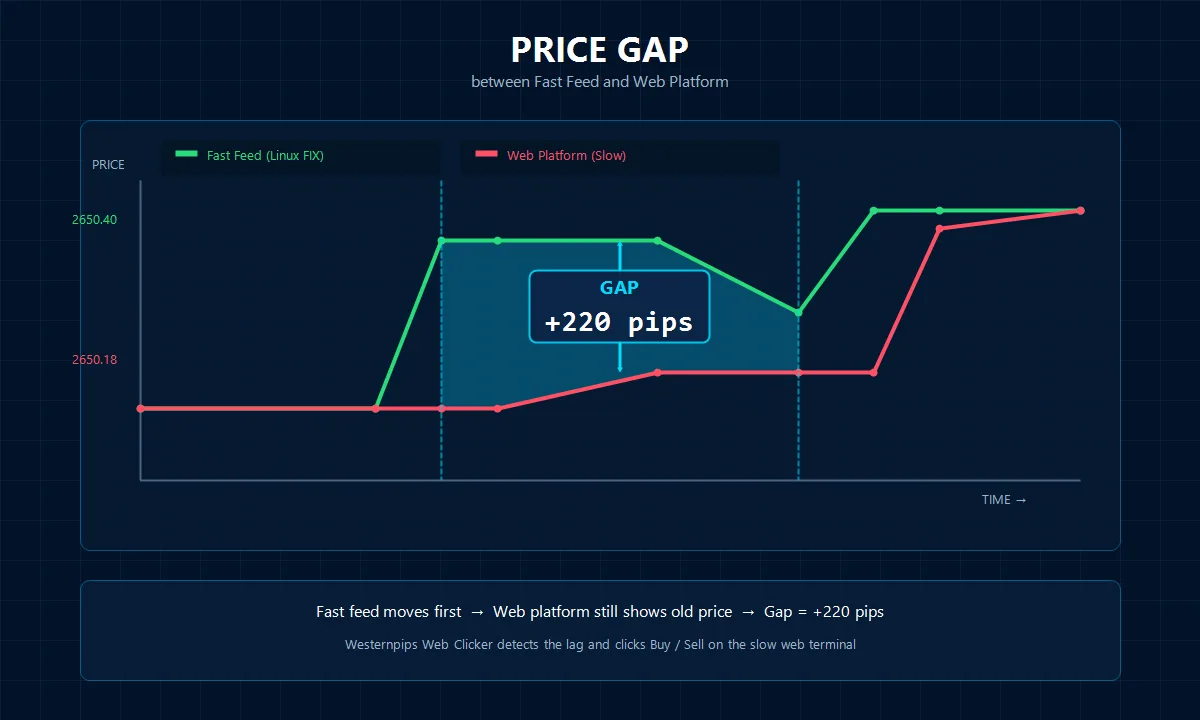
A web terminal shows prices a little later than the market. For a moment the old price is still on the screen while the fast feed has already moved. WebClick acts in that moment.
Detect the gap
Each fast quote is compared with the Web Trader price, and the gap is measured in points.
Click instantly
When the gap passes your GapForOpen value, the agent presses Buy or Sell on the one-click Web Trader.
Close on signal
The position closes by GapForClose, by a timer or by a reverse signal, again with a real click.
Price gap
Why web terminal prices fall behind
The gap is a few hundred milliseconds, too short to trade by hand and long enough for software that sees the market first.
- Brokers receive and display price updates at different speeds
- Bridges and liquidity providers add delay before the price reaches the Web Trader
- Volatility, news and server load make the lag larger and easier to see
- A browser terminal redraws prices more slowly than a trading server
For the best result, use a VPS with low ping to both the fast quote source and the broker’s web platform.
Platforms
Ready for the web trading platforms traders use
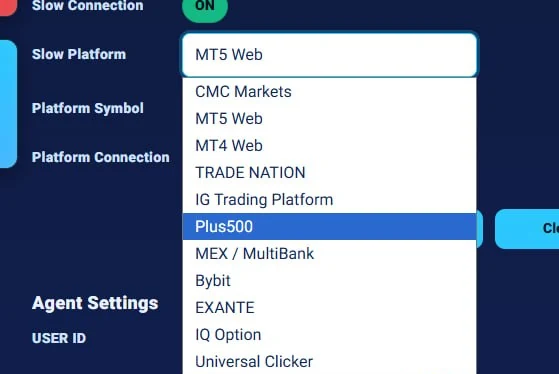
Every platform runs on full auto: the adapter knows where to read the price, where the buttons are and how to keep the session alive. New platforms are added continuously, and clients get them through the panel.
CMC Markets
Forex and CFD broker web platform.
Full autoM5 Web
M5 platform Web Trader.
Full autoM4 Web
M4 platform Web Trader.
Full autoTrade Nation
Forex and CFD broker web platform.
Full autoExness Web
Forex broker Web Trader.
Full autoIG Trading Platform
CFD broker web platform.
Full autoPlus500
CFD broker web platform.
Full autoMEX / MultiBank
Forex broker web platform.
Full autoBybit
Crypto exchange Web Trader.
Full autoEXANTE
Multi-asset broker web platform.
Full autoIQ Option
Web trading platform.
Full autoQuotex
Binary options web trading platform.
Full autoUniversal Clicker
Any other one-click web platform, set up by screen coordinates.
Any site
Settings for each platform are in the trade platforms documentation. Private 7 users can also trade Web Traders through EA and WebClick connections.
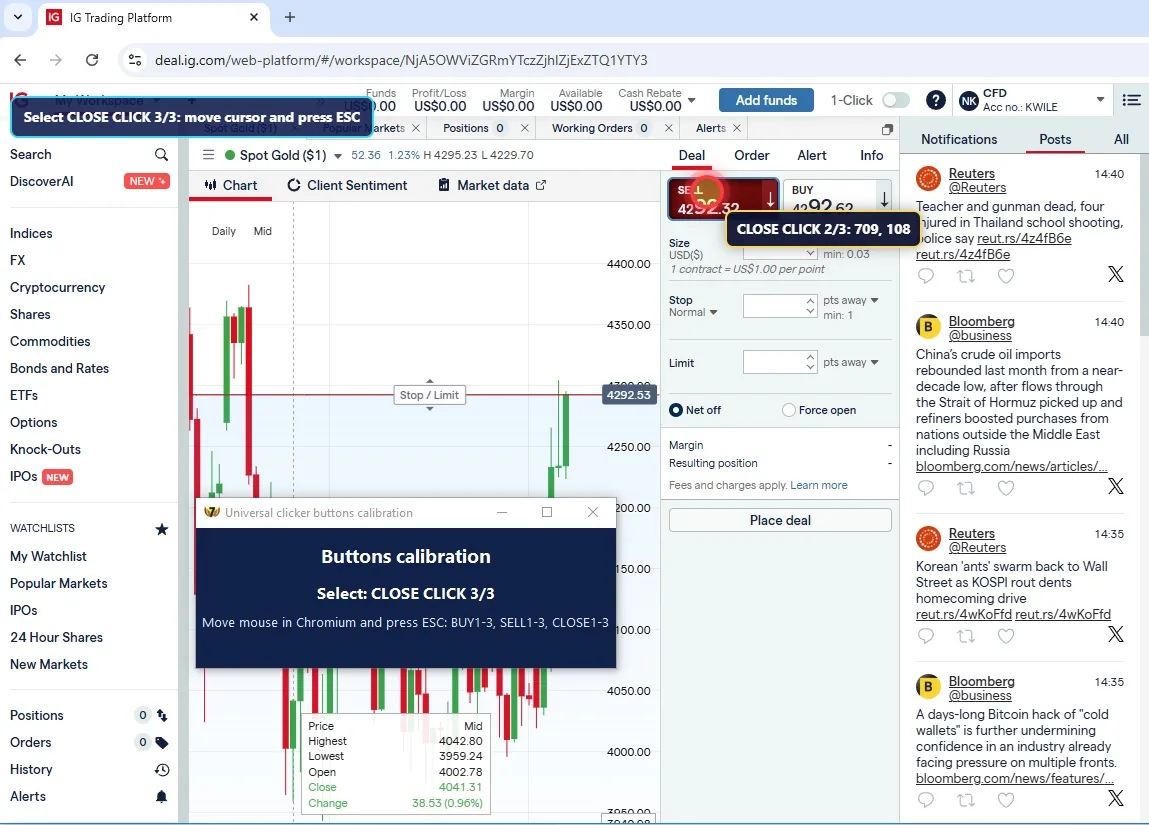
Universal Clicker
Your web trading platform is not on the list? Teach it in minutes
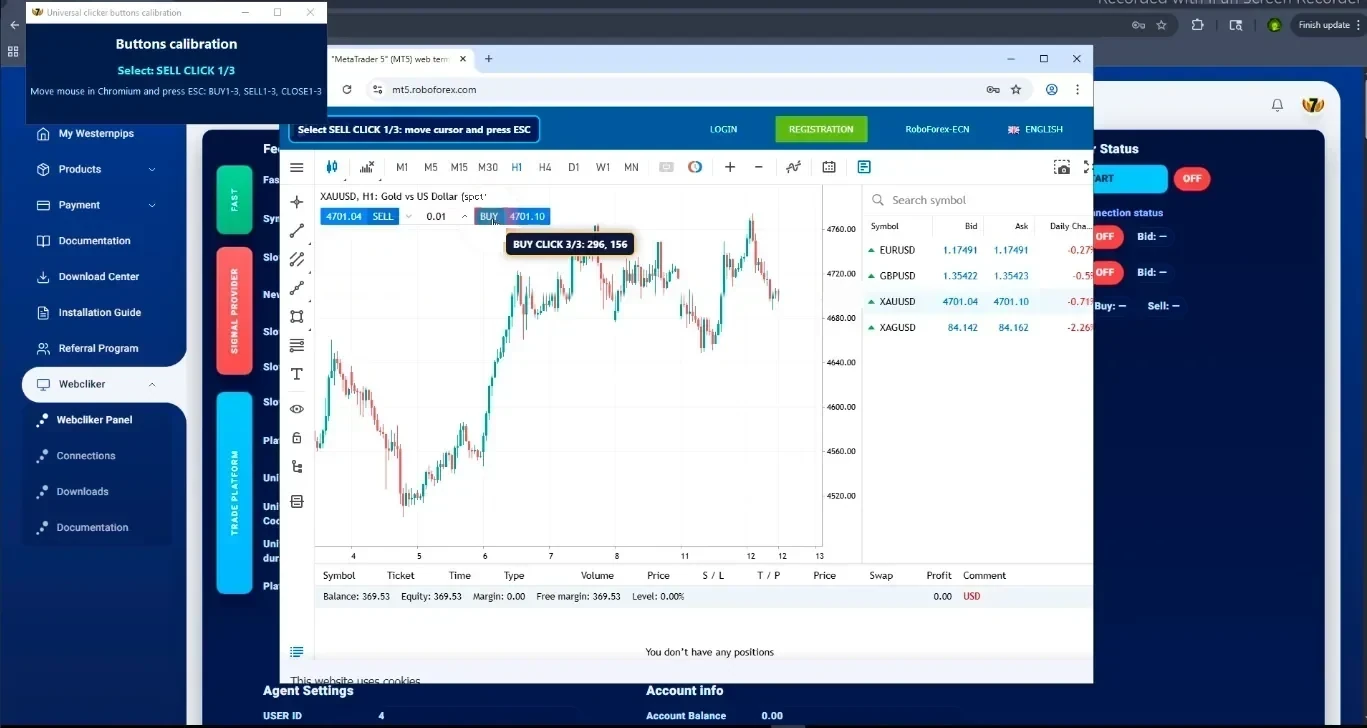
The Universal Price Scanner and Universal Clicker read quotes and click on any one-click web platform. You show WebClick where the buttons are; the algorithm does the rest.
- Coordinates
- Up to 3 click points for each action: Buy, Sell and Close.
- Wait duration
- The pause between clicks, so the platform has time to react.
- Lot size
- Set on the broker platform itself; WebClick takes care of timing and execution.
- Calibration
- Move the mouse to each button and confirm it, step by step, in Chromium.
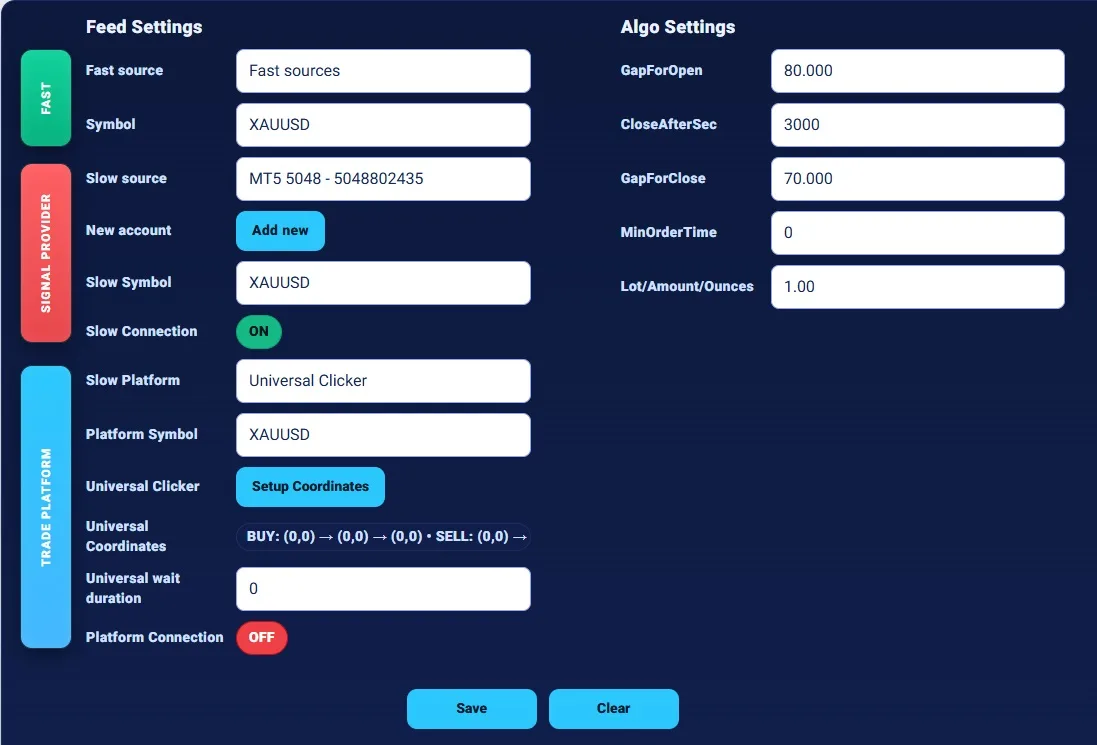
Settings
Every control for one click trading arbitrage
Sources
- Fast source: WP Fast Sources or an M4 / M5 account
- Slow source for the signal
- Trade platform where clicks execute
Symbols
- Platform Symbol mapping
- Fast XAUUSD to the platform’s GOLD
- Several instruments
Entry and exit
- GapForOpen
- GapForClose
- Close by reverse signal
- Take profit and stop loss
Time controls
- CloseAfterSec
- MinOrderTime
- Wait duration between clicks
Tracking
- Every click in the log
- Full orders history
- Open and close gap
- Slippage in pips
- Session profit in currency, % and pips
Session
- Agent session bound to your VPS IP
- One active session per user
- Login cache per platform
- Agent update from the panel
Orders history
Every trade, every millisecond, on record
The Orders History table in the panel keeps every order WebClick has made on your account: 100 orders per page, newest on top, with page navigation and a Refresh button. It shows not only the result of a trade, but why it opened, how fast it was executed and how it closed.
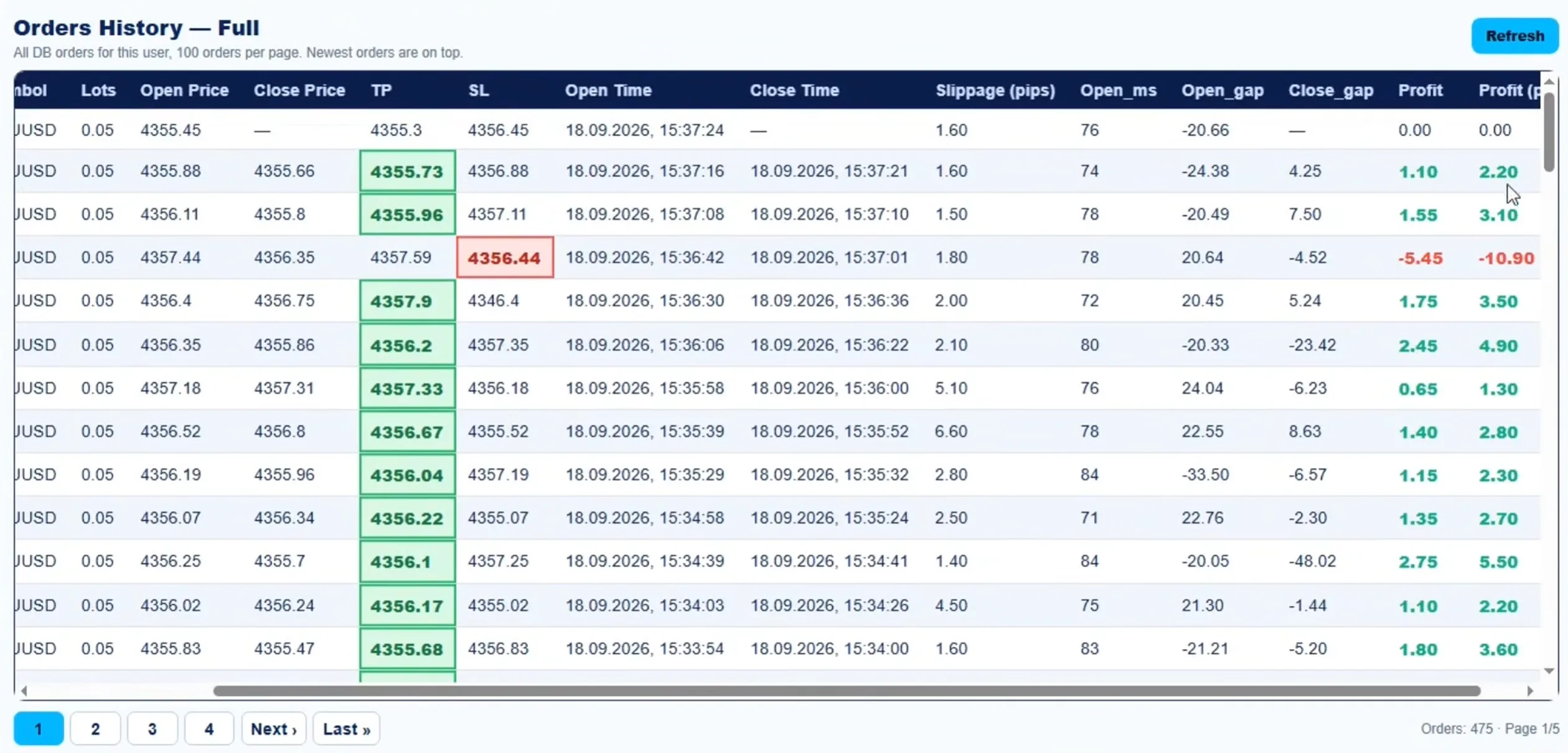
- Symbol and Lots
- The instrument and the volume of each order.
- Open and Close Price
- The prices at which the Web Trader actually filled the order.
- TP and SL
- Take profit and stop loss of the order. The level that closed the trade is highlighted: green for take profit, red for stop loss.
- Open and Close Time
- Date and time of each fill, to the second.
- Slippage (pips)
- The difference between the signal price and the price the platform gave.
- Open_ms
- How many milliseconds passed from the signal to the opened order.
- Open_gap and Close_gap
- The gap between the fast feed and the Web Trader at entry and at exit, in points.
- Profit and Profit (pips)
- The result of each trade in account currency and in pips: green for profit, red for loss.
Use the history to compare platforms and settings: slippage and Open_ms show the quality of execution, Open_gap shows whether your GapForOpen is set right, and the TP / SL highlights show how trades usually end.
Architecture
Panel, agent and browser working as one
WebClick is a web-controlled system, not a desktop black box. You manage it from any browser; the trading happens on your own VPS.
- Web panel
- Settings, Start and Stop, logs, downloads and documentation at my.westernpips.com/webclicker.
- WP Agent
- A Windows service on your VPS that connects your computer to the Westernpips system, receives commands, streams quotes locally and decides when to open and close.
- Chromium
- Portable Chromium driven by ChromeDriver from the agent folder. Real clicks on the broker’s one-click interface, with re-login guards and pop-up handling.
- Platform modules
- A dedicated adapter for each platform, plus the universal mode.
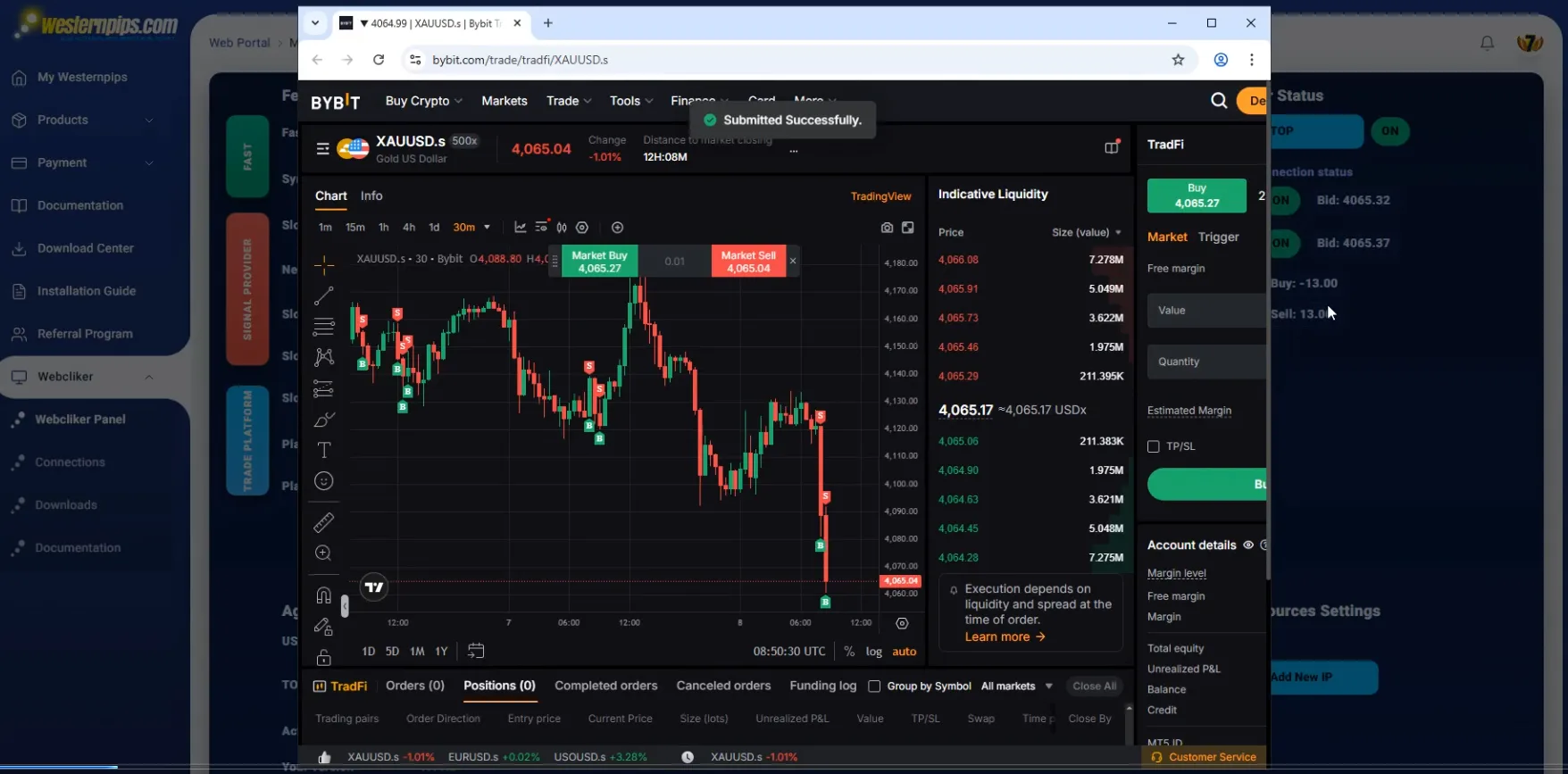
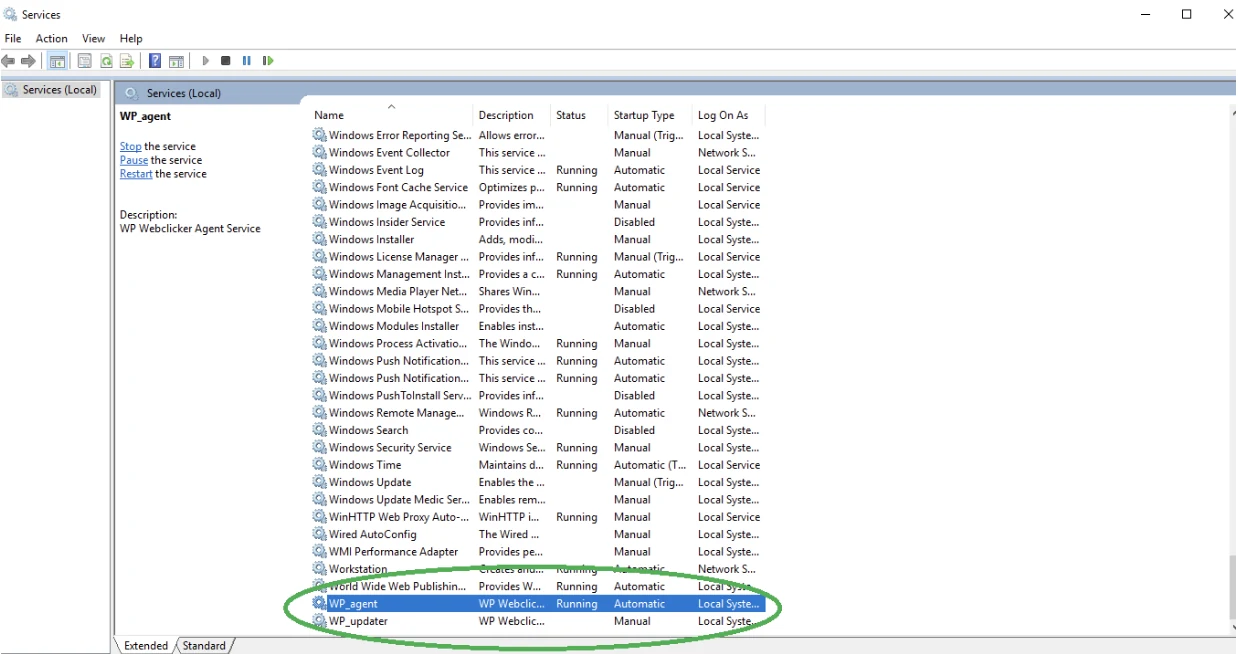
WP Agent: a Windows service that starts by itself
- After installation the WP_agent service runs in the background and starts automatically with Windows; you do not launch it by hand
- A separate WP_updater service installs agent updates
- The agent drives the broker’s Web Trader through ChromeDriver and a portable Chromium from its own folder
- With visible browser mode on, the browser window opens in the active user session, so you can watch every click on the desktop
Details: WP Agent documentation.
System requirements
Windows VPS requirements for one click trading
The WebClick agent runs a real browser on your Windows VPS or PC and clicks on the web trading platform in real time, so it needs steady resources and a low-latency connection.
| Component | Minimum | Recommended | High performance |
|---|---|---|---|
| Operating system | Windows Server 2016 R2 / Windows 10 | Windows Server 2022 R2 / Windows 11 | Windows Server 2022 R2 / Windows 11 |
| Processor | Quad-core 2 GHz or higher | 8-core 2.5 GHz or higher | 16-core 2.5 GHz or higher |
| RAM | 6 GB | 8 GB | 16 GB |
| Disk | 50 GB SSD | 100 GB SSD | 250 GB SSD |
| Internet connection | Low-latency VPS | Low-latency VPS | Low-latency VPS |
Agent requirements
- The Windows user has Administrator rights
- The VPS or PC stays powered on while the agent runs; sleep, hibernation and automatic shutdown are disabled
- A Remote Desktop (RDP) session stays available for browser-based platforms
- Correct date, time and time zone, with Windows Time Service synchronisation
- Firewall and antivirus do not block the agent, Chrome / Chromium, ChromeDriver or WebSocket connections
- A stable connection without packet loss, unstable VPN or proxy issues
- Free disk space for logs, updates and temporary files
- ChromeDriver and Chromium are not replaced manually unless Westernpips support asks
Windows updates and maintenance
- Install Windows Updates at least once every 2 weeks
- Reboot in a maintenance window, never during active trading or testing
- After a reboot, check that the agent service is running, Chrome / Chromium opens, the web trading platform connection is active and the agent is connected to the Westernpips server
- Use a clean Windows VPS with enough RAM and CPU, without unnecessary background applications
Speed depends on the web trading platform, VPS location, internet latency, browser stability and free system resources.
Full details: WebClick system requirements.
Get started
From sign-in to the first click in four steps
Open the panel
Sign in to my.westernpips.com and open WebClick.
Install the agent
Download the installer and set up the agent on your Windows VPS. It installs Chromium, ChromeDriver and WP Agent as a service.
Choose the setup
Select the trade platform, the fast and slow sources, the platform symbol and the algorithm settings.
Press Start
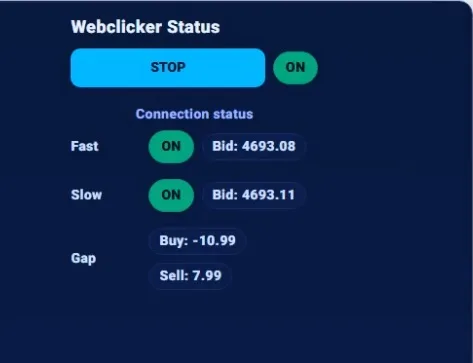
The quote stream and click execution run on the agent; watch the log and the session profit in the panel.
Step-by-step guides for the installer, the agent and Start / Stop are in the WebClick documentation.
Audience
Who WebClick is for
Arbitrage traders
Who need execution on web platforms that offer no trading API.
Forex and CFD traders
Working with CMC Markets, IG, MultiBank, Exness and M4 / M5 Web Traders.
Crypto and multi-platform traders
On Bybit, EXANTE, IQ Option and custom one-click sites.
Private 7 owners
Who already pay for WP Fast Sources and want to add Web Traders at no extra cost.
Who it is not for
WebClick is not a plug-and-play profit robot or a signal service. It suits traders who are ready to choose a platform, check its rules, measure latency and test settings themselves. Some brokers restrict latency arbitrage in their client agreements.
What is Westernpips WebClick?
WebClick is one click trading software for latency arbitrage on broker Web Traders and web terminals. It compares Westernpips fast quotes with the web trading platform price and clicks Buy, Sell and Close automatically when the price on the platform lags behind.
How is WebClick different from an API trading bot?
An API bot needs a trading API from the broker. WebClick needs only the Web Trader or web terminal: a local agent presses the platform’s own one click trading buttons in Chromium, so it works where an API is missing or blocked.
What is one click trading automation?
One click trading lets a trader open and close a position with a single click on the Web Trader, with no order window. WebClick automates exactly that: it presses the platform’s one click Buy, Sell and Close buttons for you, at the moment the Westernpips fast quotes show a price gap.
Which web trading platforms does WebClick support?
Full-auto adapters for CMC Markets, M5 Web, M4 Web, Trade Nation, Exness Web, IG, Plus500, MEX / MultiBank, Bybit, EXANTE, IQ Option and Quotex. Any other one-click web platform can be set up with the Universal Clicker.
How much does WebClick cost?
$150 per month, which is the fee for the WP Fast Sources quotes WebClick runs on. For Westernpips Private 7 owners who pay for WP Fast Sources, WebClick is included at no extra cost. Plans are on the Buy Now page.
Do I need Westernpips Private 7 to use WebClick?
No. WebClick works on its own with a WP Fast Sources subscription. Private 7 owners get it included with their WP Fast Sources subscription.
What do I need to run WebClick?
A Windows VPS or PC with low ping to the fast quote source and to the broker’s web trading platform, and an account on that platform. Minimum: Windows Server 2016 R2 or Windows 10, quad-core 2 GHz, 6 GB RAM, 50 GB SSD; recommended: Windows Server 2022 R2 or Windows 11, 8 cores, 8 GB RAM, 100 GB SSD. The Windows user needs Administrator rights. One licence covers one VPS or PC.
Can WebClick work on any web terminal?
Yes, on any web terminal with one click trading. The Universal Clicker works on any one-click web trading platform: you set up to three click points for Buy, Sell and Close and the wait between clicks. New platform adapters are also added over time.
Does WebClick guarantee profit?
No. Results depend on the platform, the broker’s rules, latency, market conditions and your settings. Some brokers restrict latency arbitrage; check the platform’s terms and test with a small volume first.
Bring latency arbitrage to your Web Trader
Choose your plan on the Buy Now page, then install the agent from the panel. Questions: WhatsApp +1 516 584 7654, Telegram @westernpips or all official contacts.
Trading Forex, CFDs and crypto involves a high risk of losing money. Read the Risk Warning.


Online Support 24/7
If you have questions about Westernpips Software products please Contact Us.